A reliable VACE prompt describes the finished shot, while the source video, mask, and reference images carry the structural controls. Start with a short 480p, 81-frame baseline, keep the seed and inputs fixed, and change only one control per test. That turns VACE prompting from guesswork into a traceable path from reference assets to an approved final shot.
This guide, checked September 4, 2026, focuses on a masked tabletop product swap rather than installation. If your environment is not working yet, use the VACE local setup guide first. For broader coverage, browse the Aikolhub AI video hub.
Table of Contents
Verify the current VACE baseline
VACE unifies reference-to-video, video-to-video, masked video-to-video, and composed controls through a common condition interface. The technical paper calls this the Video Condition Unit. In practice, you still have to decide which pixels and frames are evidence, which may be generated, and what the prompt should describe.
Release and license snapshot
The official VACE repository was active and not archived when checked. Its latest commit remained October 17, 2025, and its newest dated news item was the same day’s benchmark update; GitHub listed no packaged releases. The repository code uses Apache-2.0. The current Wan2.1-VACE-1.3B and Wan2.1-VACE-14B model cards also list Apache-2.0. Verify every downloaded checkpoint and dependency separately rather than transferring that license to community conversions.
Two supported execution routes
The original repository exposes preprocessing plus Wan inference scripts. Current Diffusers documentation also exposes WanVACEPipeline with video, mask, reference images, conditioning scale, seed generator, frames, steps, and guidance controls. Pick one route for a benchmark and record its version. For production comparisons, the Diffusers video pipeline workflow explains why changing wrappers mid-test destroys comparability.
Choose the control before writing
The prompt cannot repair the wrong task definition. The official VACE user guide says R2V needs references and a prompt, while masked editing needs source video, mask, and prompt. A composed swap uses all four.
| Goal | Required evidence | What to inspect first |
|---|---|---|
| Generate a subject | Reference images + prompt | Identity and object silhouette |
| Guide motion or layout | Control video + prompt | Pose, depth, flow, or track stability |
| Edit one region | Source video + mask + prompt | Temporal mask edges |
| Swap a subject or object | Source + mask + references + prompt | Condition conflicts |
| Extend a clip | First/last frame or clip + prompt | Join-frame continuity |
Build the cobalt-jar shot
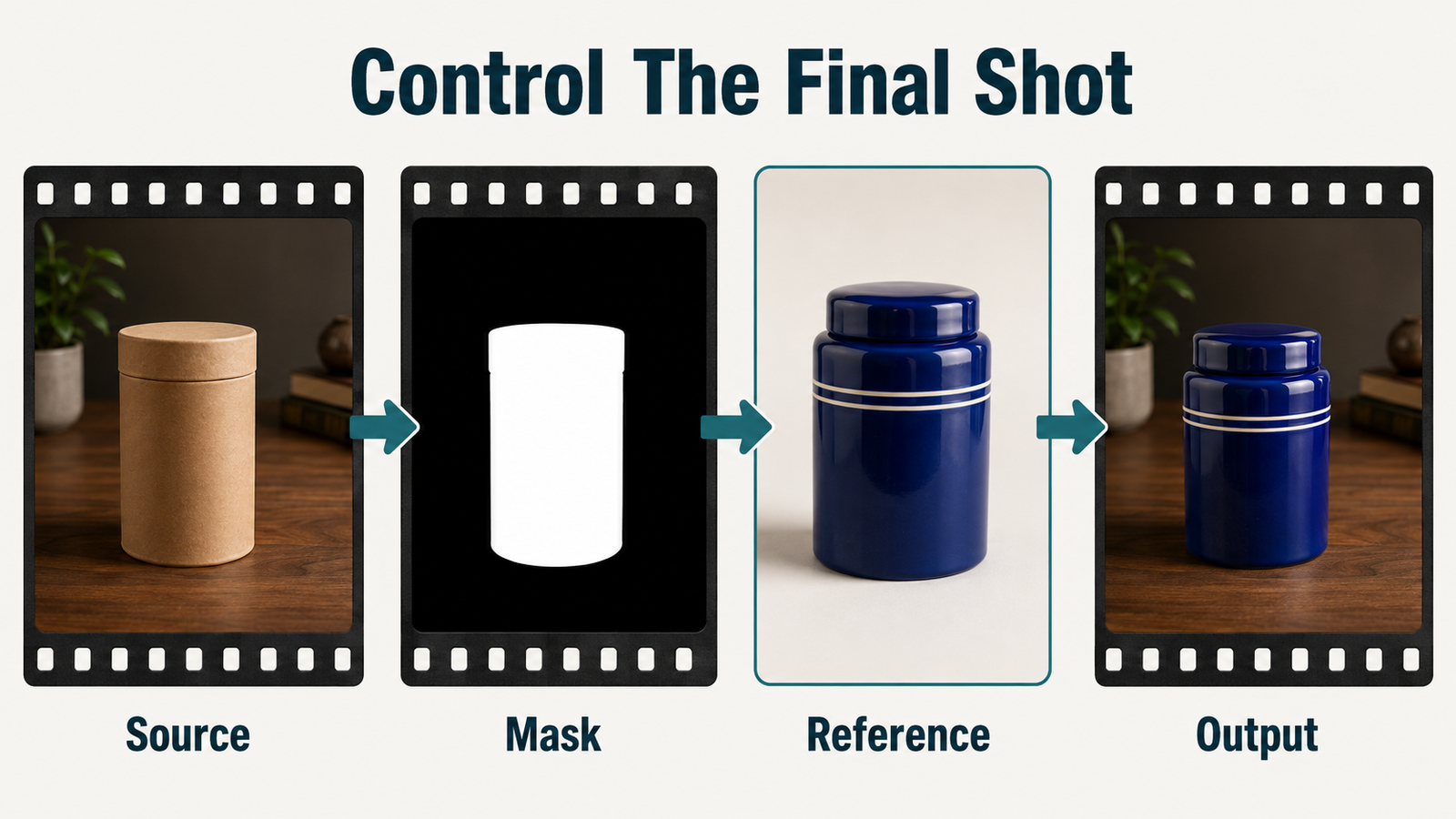
The worked example replaces a plain cardboard canister in a locked five-second tabletop clip with a cobalt ceramic jar. A hand enters, rotates the jar about 20 degrees, and exits. The wood grain, window light, camera, and hand motion should remain stable. The job is small enough to diagnose yet demanding enough to reveal reference, mask, and temporal failures.
Prepare four input contracts
- Source: one stable clip with no cut, exposure change, zoom, or focus pull.
- Mask: white over the canister and necessary hand-contact boundary; black over pixels to retain.
- Reference: one clean three-quarter jar view, plus a side view only if the rotation reveals it.
- Prompt: the visible final scene, action, camera, light, and material behavior.
Diffusers documents the same mask convention: black conditions or preserves a region; white asks the model to generate it. Do not invert it accidentally. Keep reference crops clean and remove unrelated props that could leak into the shot.
Inspect preprocessed evidence
Before inference, view the prepared src_video, src_mask, and src_ref_images. Scrub the mask frame by frame. It should cover the rotating canister without flashing onto the table. A narrow halo may leave cardboard edges; an oversized mask may regenerate the hand or wood grain. This inspection is faster than trying to prompt away preprocessing errors.

Write a descriptive VACE prompt
The official guide explicitly recommends descriptive text instead of instructions. Describe what the final shot contains. Avoid a command list such as “replace this, preserve that, do not change the table,” because those words do not supply a coherent visual scene.
Prompt formula
[Visual style and shot size]. [Subject/object with identity, shape, material, and color]. [One chronological action]. [Camera behavior]. [Environment and spatial anchors]. [Lighting direction and continuity]. [End state].Put identity and material early, one action in the middle, and camera behavior once. Name observable properties: “glossy cobalt glaze with two thin white rings” is more testable than “premium beautiful jar.” If you use prompt extension, diff the expanded text before rendering. The VACE repository warns that expansion can invent details that conflict with an editing source.
Copyable prompt templates
Locked product swap:
Photorealistic medium tabletop shot. A cylindrical cobalt-blue ceramic jar with two thin white rings stands on the marked center of a walnut table. A right hand enters from frame right, turns the jar gently clockwise by about 20 degrees, releases it, and leaves. The camera stays locked. Soft window light comes from frame left; the wood grain and background remain visually continuous. The jar finishes upright at center.
Reference-to-video:
Natural commercial close-up. The same [subject anchors] appears in [fixed environment]. [One subject action] unfolds from start to finish. A [single camera move or locked camera] maintains [framing]. [Light direction, palette, and background anchors] remain consistent.For a model-specific multi-reference experiment, compare this role clarity with the SkyReels-V3 reference role-binding guide. VACE adds masks and source-video evidence, so conflicts are not only between images and text.

Run the fixed-seed ablation
Save a baseline with all four inputs, seed 42, one output, and unchanged model settings. Then create three diagnostic cells. In B, remove only the jar reference; if shape or glaze collapses, the reference was doing useful work. In C, use a deliberately looser but still safe mask; changes in wood grain or fingers reveal mask sensitivity. In D, restore the good mask and reference but enable or paste the expanded prompt; any new props, camera motion, or lighting shift belongs to the text change.
| Cell | Only change | Expected observation | Stop condition |
|---|---|---|---|
| A: Full | None | Jar identity and retained scene are measurable | Inputs fail to load |
| B: No reference | Remove jar image | Shows how much identity came from text | Output is unchanged because reference was not connected |
| C: Loose mask | Expand white region | Tests hand and table regeneration | Retained geometry drifts |
| D: Expanded | Prompt text only | Reveals invented scene details | Expansion contradicts source |
This is a diagnostic worksheet, not a claim that seed 42 guarantees identical pixels across hardware or software versions. It makes runs more comparable within one recorded environment.

Use a quality-speed worksheet
The original Wan VACE path defaults to 81 frames, 50 sampling steps, guidance 5.0, and UniPC. Current Diffusers uses the same 81-frame, 50-step, guidance-5 baseline at 480 by 832; its official VACE example demonstrates 30 steps. Use 30 only to rank controls, then confirm the selected condition at the documented default.
| Pass | Model route | Size / frames | Steps | Decision |
|---|---|---|---|---|
| Control triage | 1.3B | 480p range / 81 | 30 | Reject bad reference or mask combinations |
| Prompt approval | 1.3B | 480p range / 81 | 50 | Approve wording and seed |
| Delivery candidate | 14B when available | 720p range / 81 | 50 | Compare visible gain against runtime |
| Fallback | 1.3B | 480p range / 81 | 50 | Deliver after clean upscale if 14B fails |
The official repository shows the 1.3B 480p path on one GPU and its 14B 720p example with eight processes, FSDP, and sequence parallelism. That is a documented route, not a universal hardware minimum. Record wall time and peak VRAM on your machine. Keep conditioning scale at its 1.0 default until the baseline is valid; changing it together with steps makes the result ambiguous. For Wan prompting context, see the Wan2.2 A14B control guide, but do not transfer its settings to Wan2.1 VACE.
Complete the production workflow
Preflight and render
- Record the repository commit, checkpoint ID, license, wrapper version, GPU, and free memory.
- Confirm source, mask, and reference dimensions and inspect every asset.
- Run cell A at the triage setting and save inputs beside the output.
- Run B through D with one change each; record wall time and peak VRAM.
- Choose the cleanest control contract, not merely the sharpest single frame.
- Render the 50-step approval pass with the chosen seed and untouched inputs.
- Attempt the heavier delivery route only when it solves a visible defect.
Review temporal evidence
Compare the first, middle, and last frames plus the frame where the hand touches the jar. Score jar silhouette, white-ring count, glaze color, hand anatomy, contact, table grain, background position, exposure, and camera lock as pass or fail. Watch at normal speed for flicker, then step frame by frame around the contact moment. A perfect first frame is not proof of temporal consistency.
Validate the final export
Keep the generated master before editing. Then confirm that the delivery file opens independently and reports the intended technical fields:
ffprobe -v error -select_streams v:0 \
-show_entries stream=codec_name,width,height,avg_frame_rate,nb_frames \
-show_entries format=duration -of json final-shot.mp4- Final URL or file points to the approved take, not a triage render.
- Width and height match the chosen pass and are even-numbered.
- Frame rate is explicit and playback duration matches the edit.
- Frame count is populated or independently counted.
- No first/last-frame corruption, black flash, or frozen tail appears.
- Mask edges remain stable at the hand-contact moment.
- Colors and levels survive the delivery encode.
- The master, prompt, seed, model ID, inputs, and scorecard remain archived.
Separate visual and audio continuity
VACE’s documented interface is visual; it does not expose a native synchronized speech or voice-identity stage. Approve the picture first. Add music, effects, authorized speech, and lip sync separately, with consent and provenance for any cloned voice. A stable face does not prove timing, pronunciation, or speaker identity.
Troubleshoot by visible symptom
| Symptom | Likely control | Next single change |
|---|---|---|
| Cardboard rim remains | Mask too tight | Expand only the rim boundary |
| Table grain swims | Mask too loose | Return table pixels to black |
| Jar color drifts | Weak or conflicting reference | Use one clean reference and exact visible anchors |
| New props appear | Expanded prompt | Disable expansion or delete invented nouns |
| Hand melts at contact | Hard occlusion problem | Shorten contact and refine the temporal mask |
| Camera creeps | Prompt/action overload | Use a locked-camera description and one action |
| Out of memory | Route too heavy | Return to 1.3B 480p before changing quality controls |
Official sources and limitations
Official evidence checked September 4, 2026: the repository and model table, commit history, user guide, code license, Wan2.1 VACE 1.3B and 14B model cards, Diffusers Wan documentation, and the VACE technical paper.
VACE may resize very large inputs, and the user guide says long inputs are trimmed or sampled to around five seconds. Reference conditioning does not guarantee exact identity, masks can flicker, composed controls can conflict, and high-resolution 14B work is compute-heavy. Benchmark results are local observations, not universal quality or VRAM promises.
Edit AI videos here
Assemble the approved VACE take, trim unstable edge frames, add authorized audio and captions, and export delivery versions at https://ai.alphatechnologies.vn. Keep the untouched master and benchmark worksheet beside the project.
Final recommendation
Treat every VACE shot as a four-part control contract: source, mask, references, and descriptive prompt. Prove the contract at 1.3B and 480p, isolate failures with a fixed-seed ablation, then spend more compute only on a selected take. Explore Aikolhub for more practical, official-source AI video workflows.
Frequently asked questions
Should a VACE prompt use instructions?
Prefer a description of the visible finished shot. The official guide recommends descriptive prompts rather than instruction lists.
What do black and white mask areas mean?
Black marks conditioning or retained regions; white marks regions VACE should generate. Inspect the temporal mask before inference.
How many reference images can VACE use?
The official composition table limits its reference_anything example to no more than three images. Use the fewest non-conflicting views needed for the shot.
Are 30 steps enough?
Thirty steps are useful for a documented screening pass. Confirm the selected control contract at the current 50-step default before delivery.
Does VACE generate synchronized audio?
No native synchronized-audio workflow is documented for VACE. Add authorized voice, sound, and lip sync in separate reviewed stages.