What is a vision language model?
A vision language model, or VLM, is an AI model that can take images and text together, then produce text answers, structured data, instructions, captions, summaries, or decisions. In plain English, it lets an AI assistant look at a photo, screenshot, chart, product image, document, or interface and explain what it sees.
Updated June 21, 2026, this guide focuses on practical image understanding rather than hype. Official documentation from OpenAI, Google Gemini, Anthropic Claude, and Mistral confirms a clear direction: modern multimodal models can analyze images, answer questions about visual content, compare multiple images, and support workflows that used to require separate OCR, computer vision, and language models.
Quick answer: what can VLMs do at work?
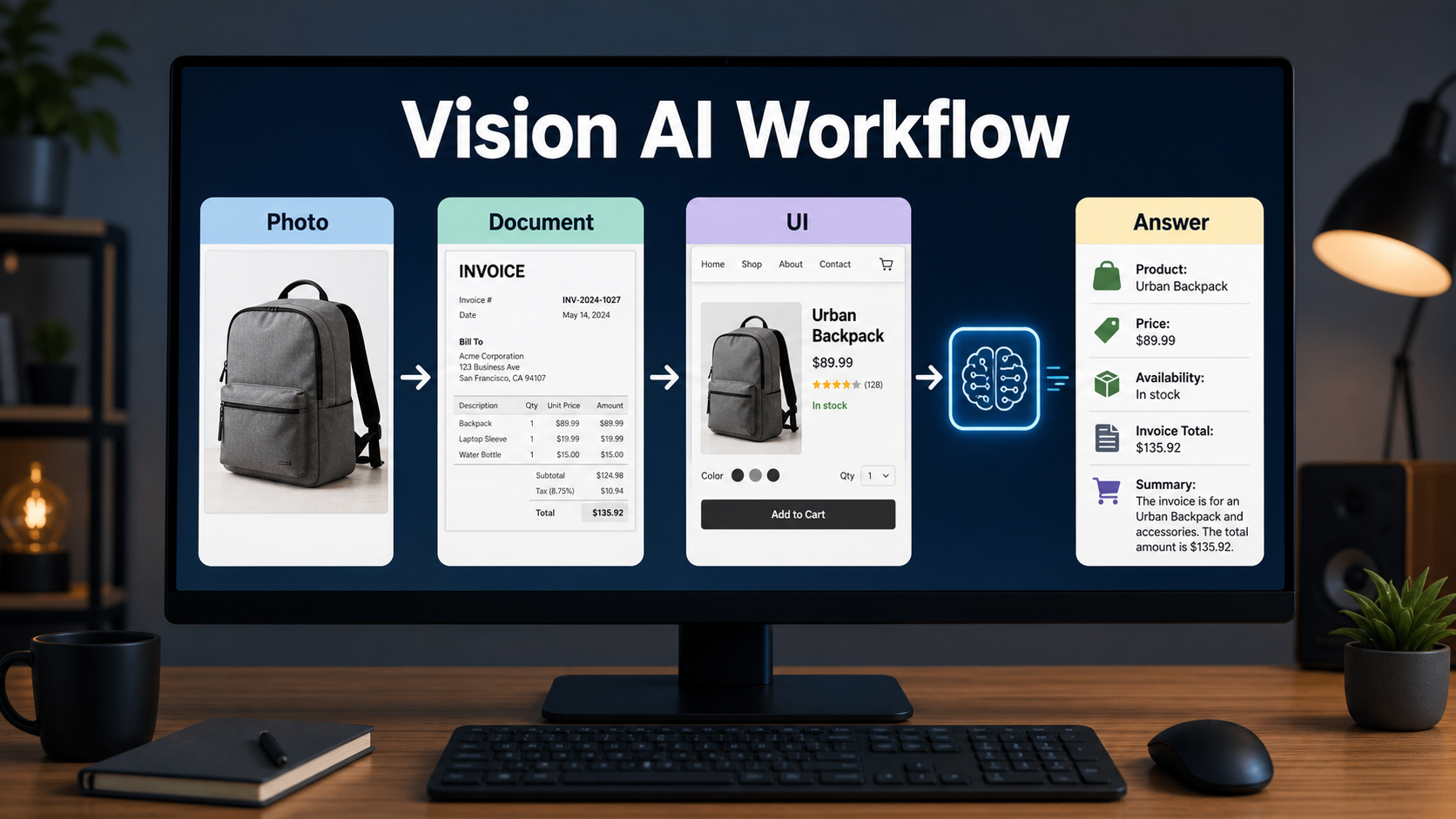
Vision language models are useful when your workflow starts with visual information but needs a text result. That result might be a product description, an extracted invoice total, a UI quality report, an accessibility note, a moderation decision, or a support answer based on a screenshot.
| Visual input | Useful VLM output | Best business use |
|---|---|---|
| Product photo | Attributes, defects, color, style, packaging notes | Ecommerce listings and ad creative review |
| Invoice or receipt | Vendor, date, line items, totals, exceptions | Finance operations and document triage |
| Website screenshot | UX issues, missing CTA, layout observations | Marketing audits and QA workflows |
| Social image or ad | Brand safety notes and content summary | Campaign review and moderation |
| Chart or dashboard | Plain-language explanation and caveats | Reporting, analytics, and client updates |
How is a VLM different from an image generator?
A VLM reads images. An image generator creates or edits images. Some platforms combine both abilities, but the job is different. If you upload a screenshot and ask what is wrong with the checkout page, you are using image understanding. If you ask for a new checkout-page mockup, you are using image generation.
This distinction matters for creators and developers. A vision language model is best for analysis, extraction, reasoning, comparison, and workflow automation. A text-to-image or image-editing model is best for producing visuals. A strong content stack often uses both: first a VLM checks what is in an asset, then a generator creates or revises the next version.
Current official capabilities to know
OpenAI’s images and vision guide says recent language models can process image inputs and analyze them, and that the Responses and Chat Completions APIs can use images as input for text or audio outputs. The same guide also lists image input requirements and reminds developers that image inputs are metered as tokens.
Google’s Gemini API image-understanding documentation says Gemini models are multimodal and can handle image captioning, visual question answering, classification, and object detection. Anthropic’s Claude vision documentation describes image analysis through claude.ai, the Console Workbench, and API requests, including the ability to analyze multiple images together. Anthropic’s model overview also states that current Claude models support text and image input, text output, multilingual capabilities, and vision.
Mistral’s vision documentation says its vision-capable models can analyze images and provide insights based on visual content, with image URLs or base64 images passed to the Chat Completions API. Mistral also points document parsing, OCR, and data extraction users toward Document AI when that is the better fit.
Practical VLM use cases for creators and marketers
For creators and marketers, VLMs are most useful as quality-control assistants. They can quickly review visual assets, summarize what a customer would see, and turn screenshots into action items.
Product listing improvement
Upload a product photo and ask the model to identify visible features, likely materials, color names, packaging issues, and missing listing details. This helps turn raw product images into SEO descriptions, alt text, and ad copy. It is still important to verify facts against the actual product specification, because a VLM can infer incorrectly from an image.
Ad creative review
A VLM can review a social ad image for clarity, visual hierarchy, product visibility, CTA prominence, and possible policy risks. It can also compare three ad variants and explain which one communicates the offer fastest.
Screenshot-based UX audits
For landing pages, app screens, and checkout flows, a VLM can turn screenshots into structured feedback. Ask it to list confusing elements, missing trust signals, mobile readability issues, and obvious conversion blockers. Treat the output as a first-pass audit, then confirm with real user behavior and analytics.
Practical VLM use cases for developers
Developers can use VLMs as an interface layer between messy visual inputs and structured systems. The best early wins are narrow, reviewable workflows where mistakes can be caught before they affect customers.
Document triage and OCR support
VLMs can inspect receipts, invoices, forms, and screenshots, then return a structured summary. For production finance or compliance work, do not rely on a generic answer alone. Use a schema, validate totals, keep the source image, and route low-confidence outputs to a human reviewer.
Visual customer support
When users send screenshots, a VLM can identify the screen state, error message, selected options, or likely next step. This is useful for SaaS support, ecommerce checkout issues, and creator tool troubleshooting. The model should answer with uncertainty when the screenshot is unclear.
Automated QA from screenshots
A VLM can compare a current screenshot with an expected design, detect missing content, and describe layout problems in natural language. This does not replace deterministic visual regression tests, but it helps humans understand why a screenshot failed.
Prompt tips for better image understanding
Good VLM prompts are specific about the task, the output format, and the level of uncertainty required. Do not ask only what is in this image if you need a business-ready result. Tell the model what role it should play and what decision you need to make.
Task: Analyze this product photo for an ecommerce listing.
Return: JSON with product_type, visible_features, color, possible_defects, alt_text, and questions_for_human_review.
Rules: Do not guess brand, material, price, size, or availability unless visible in the image. Mark uncertain fields as unknown.
For screenshots, add context:
Task: Review this mobile checkout screenshot for conversion issues.
Audience: ecommerce growth team.
Return: top 5 issues, severity, why it matters, and a suggested fix.
Rules: Focus only on visible UI. Do not assume analytics data.
Checklist before using VLMs in production
- Choose the model based on the actual image type: screenshots, product photos, documents, charts, or mixed inputs.
- Test with blurry, cropped, rotated, low-light, and mobile screenshots from your real workflow.
- Use structured outputs when the result enters a database or automation.
- Require the model to mark uncertainty instead of guessing.
- Log the source image, model, prompt, date, and human review result.
- Review privacy rules before uploading customer documents, faces, IDs, contracts, or confidential screens.
Pros and cons of vision language models
| Pros | Cons |
|---|---|
| They turn visual inputs into searchable, reusable text. | They can describe images incorrectly or miss small details. |
| They reduce the need for many narrow computer vision models. | They may struggle with tiny text, rotated content, charts, and precise spatial tasks. |
| They work well for review, support, and content workflows. | They need human review for legal, medical, financial, and brand-critical decisions. |
| They can compare multiple images and explain differences. | Image tokens can raise cost if you send many high-resolution images. |
Limits and safety rules
Vision language models are powerful, but they are not perfect visual truth machines. OpenAI’s official guide lists limitations such as small text, rotated images, graph interpretation, spatial reasoning, and possible incorrect captions. Those limitations are practical, not theoretical. They show up when a workflow depends on tiny SKU labels, legal text, chart colors, or pixel-perfect layout details.
For sensitive work, use a simple policy: the model can assist, but the system must verify. Medical images, identity documents, financial documents, legal contracts, and safety-critical interfaces need domain rules, validation, and human review. If a provider does not officially confirm a capability, region, retention rule, or compliance term for your use case, treat it as not officially confirmed.
Edit AI videos here
VLMs are also useful before and after video production. You can analyze thumbnails, storyboard frames, product shots, captions, and screenshots, then turn the best visual ideas into short clips. If you need to edit AI videos, cut social versions, add captions, or prepare creator-ready assets, use https://ai.alphatechnologies.vn.
How to choose a VLM for your workflow
Start with the job, not the model name. If your work is mostly product photos, test attribute extraction and hallucination rate. If it is documents, test OCR quality, table extraction, and confidence handling. If it is UI screenshots, test layout reasoning and whether the model can separate visible facts from design advice.
A practical benchmark needs only 30 to 100 real samples at first. Create a small labeled set, score exact fields, track review time saved, and calculate cost per successful item. This is more useful than a general leaderboard because your image quality, language, domain, and risk tolerance are specific to your business.
Conclusion
A vision language model is the bridge between visual content and useful text. For creators, it can speed up product descriptions, alt text, ad review, and creative QA. For developers, it can power screenshot support, document triage, structured extraction, and multimodal agents.
The best way to adopt VLMs is careful and practical: pick one narrow workflow, verify official model capabilities, test real images, require uncertainty labels, and keep human review where mistakes matter. Explore more AI tools on Aikolhub to build a complete stack for image understanding, generation, video editing, and content automation.
FAQ
What does VLM stand for?
VLM stands for vision language model. It is an AI model that can process visual inputs and language prompts together, then produce text-based answers or structured outputs.
Can a vision language model generate images?
A VLM mainly understands images. Some platforms combine image understanding with image generation, but analysis and generation are different tasks.
Are VLMs good for OCR?
They can help with OCR-style workflows, especially when you need interpretation as well as text extraction. For strict document processing, use validation and consider dedicated Document AI tools.
Can I use VLMs for ecommerce product photos?
Yes. VLMs can create alt text, identify visible product features, flag defects, and help draft listings. Verify facts such as material, size, brand, and price from trusted product data.
Do VLMs work with screenshots?
Yes. Screenshots are one of the most useful VLM inputs for support, QA, UX review, and workflow automation. Use high-resolution screenshots and ask for uncertainty when details are unclear.