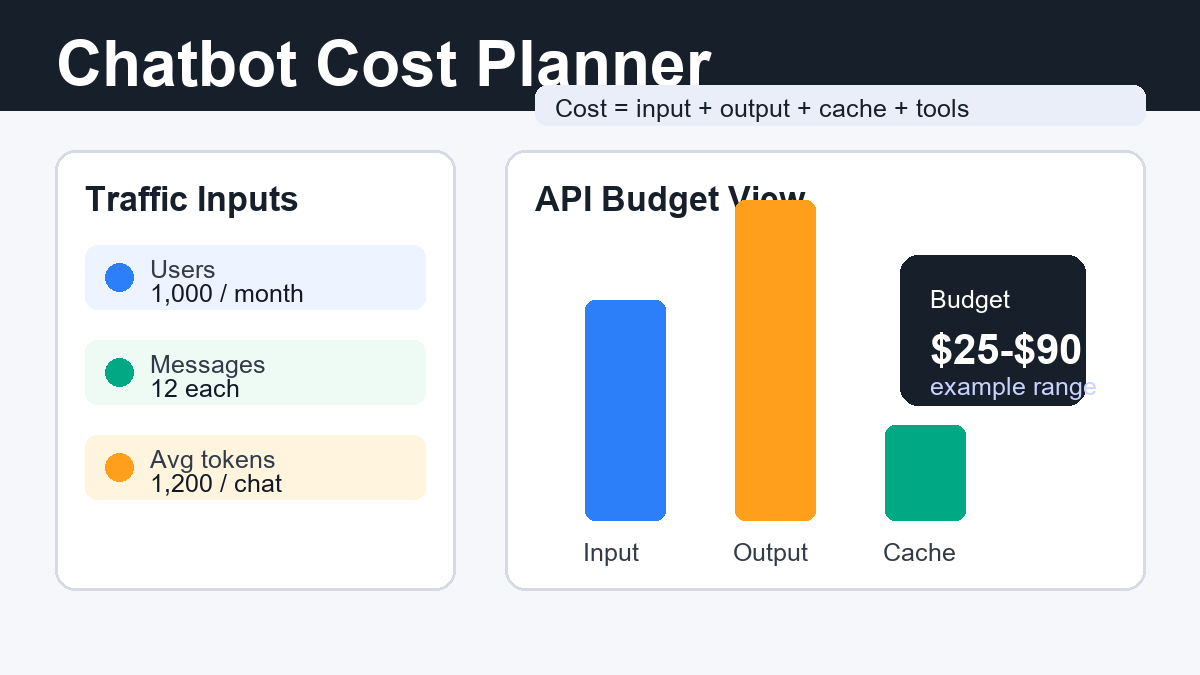
Chatbot AI cost is usually estimated by multiplying monthly conversations by average input tokens, output tokens, cache reads, and any extra tool calls. As of June 23, 2026, official API pricing still varies widely by model family, so a useful estimate starts with your workflow rather than a single headline model price.
This guide gives creators, marketers, developers, and AI tool operators a practical way to forecast chatbot API costs before launching a support bot, product assistant, internal knowledge bot, or lead qualification workflow. The goal is to build a cost model you can test, monitor, and improve.
Why chatbot AI costs exceed the first estimate
Most chatbot budgets go wrong because teams count only the user’s message and forget everything else the model must read or write. A production chatbot may include a system prompt, brand rules, safety instructions, retrieved documents, conversation history, tool schemas, search results, and the assistant’s answer.
That means a short customer question can trigger a much larger API request. A shopper asking, “Does this product fit my camera?” may cause the bot to read product metadata, return policy text, compatibility notes, and previous chat context. The visible message is small; the hidden context is the real cost driver.
Costs also rise when the chatbot uses premium models for every message, sends long histories without summarization, performs web searches, or retrieves too many documents. Separate normal conversations from edge cases that need larger context or stronger reasoning.
The simple chatbot API cost formula
Use this formula first: monthly cost = input token cost + output token cost + cache cost + tool cost + image/audio cost if used. For text-only support bots, input and output tokens usually dominate. For multimodal bots, images, audio, realtime sessions, search, and code tools can become meaningful line items.
A practical spreadsheet can use these fields:
| Field | What to measure | Why it matters |
|---|---|---|
| Monthly active users | People who chat with the bot | Defines your traffic baseline |
| Conversations per user | Average sessions per month | Separates casual use from heavy support use |
| Turns per conversation | User messages plus assistant replies | Long chats multiply context cost |
| Input tokens per turn | User text, system prompt, history, retrieved context | Usually the largest hidden cost |
| Output tokens per turn | Assistant answer length | Premium models often charge more for output |
| Cache hit rate | Reusable prompt or context percentage | Reduces repeated input cost when supported |
| Tool calls | Search, retrieval, code, or external API calls | Some tools add separate fees or extra tokens |
For a first estimate, test 50 to 100 real conversations. Log token usage from the API response, then average by conversation type: sales, support, onboarding, document Q&A, and complex troubleshooting.
Official pricing examples checked June 23, 2026
Official pricing should be rechecked before launch because model names and prices change. The examples below are taken from official pricing pages reviewed on June 23, 2026 and are included to show how model choice changes a budget.
| Provider example | Input price | Output price | Useful note |
|---|---|---|---|
| OpenAI GPT-5.4 mini | $0.75 / 1M tokens | $4.50 / 1M tokens | OpenAI also lists cached input at $0.075 / 1M tokens. |
| OpenAI GPT-5.4 | $2.50 / 1M tokens | $15.00 / 1M tokens | Useful when quality matters more than the lowest cost. |
| Anthropic Claude Sonnet 4.6 | $3 / MTok | $15 / MTok | Claude docs list cache reads at $0.30 / MTok. |
| Anthropic Claude Haiku 4.5 | $1 / MTok | $5 / MTok | A lower-cost option for simpler support and routing tasks. |
| Google Gemini 2.5 Pro | $1.25 / 1M tokens for prompts up to 200k | $10 / 1M tokens for prompts up to 200k | Google lists higher prices for prompts over 200k tokens. |
| Mistral Medium 3.5 | $1.50 / 1M tokens | $7.50 / 1M tokens | Mistral positions it as a cost-efficient enterprise model. |
Sources checked: OpenAI API Pricing, Claude API Pricing, Gemini API Pricing, and Mistral Pricing.
Example: estimating cost for 1,000 chatbot users
A realistic budget example should use actual token volume, not just user count. Imagine a support chatbot with 1,000 monthly users, two conversations per user, six assistant replies per conversation, and an average of 900 input tokens plus 300 output tokens per turn.
The monthly volume is 2,000 conversations and 12,000 assistant turns. That creates about 10.8 million input tokens and 3.6 million output tokens. With a lower-cost model priced at $1 per 1M input tokens and $5 per 1M output tokens, the text generation line item would be about $28.80 before tool calls, retries, image/audio processing, taxes, or provider-specific minimums.
With a stronger model priced at $3 per 1M input tokens and $15 per 1M output tokens, the same traffic would be about $86.40. Long answers push output cost up; large knowledge-base context pushes input cost up.
This is why the best architecture is usually tiered. Use a lower-cost model for classification, FAQ answers, and routing. Escalate to a stronger model only for complex troubleshooting, legal-sensitive wording, code analysis, or high-value customer conversations.
How prompt caching changes the budget
Prompt caching lowers cost when the chatbot repeatedly sends the same instructions, policy text, product catalog summary, or long conversation prefix. It is less helpful when every request contains entirely new context.
Official OpenAI pricing examples include cached input prices that are lower than standard input prices for listed models. Claude pricing explains cache writes and cache reads separately: a cache hit is billed at 0.1x the standard input price, while cache writes cost more than a normal input token depending on duration. Gemini pricing also lists context caching prices and storage rates for supported models.
For chatbot builders, cache stable context, not noisy context. Good cache candidates include the system prompt, brand voice rules, safety policy, output format instructions, onboarding script, and frequently used product or support documents. Poor cache candidates include live order details, one-off customer messages, and rapidly changing retrieved snippets.
Cache checklist
- Keep your system prompt stable across many requests.
- Place reusable policy and formatting rules before dynamic user content.
- Summarize long histories instead of sending every prior turn forever.
- Measure cache hit rate in logs.
- Recheck provider docs because cache behavior can differ by model.
Cost controls that work in production
The most reliable way to control chatbot cost is to limit unnecessary context before it reaches the model. Shorter prompts, better retrieval, and answer length rules usually save more than switching providers.
1. Route by task difficulty
Classify each message before choosing a model. FAQ, greeting, refund status, and appointment questions can use a cheaper model. Complex reasoning, policy ambiguity, or high-value sales conversations can use a stronger model.
2. Retrieve fewer, better documents
Many RAG chatbots send too many chunks. Start with three to five high-confidence passages. Use metadata filters by product, language, region, and customer segment so irrelevant documents do not inflate token usage.
3. Cap answer length by intent
A support answer rarely needs 900 words. Set style rules for short bullets, tables, and clarifying questions. Output tokens are often more expensive than input tokens, so concise answers matter.
4. Monitor retries and failed tool calls
Retries can silently double cost. Track timeout retries, failed retrieval calls, malformed JSON responses, and user rephrases caused by unclear answers.
5. Set hard budget alerts
Use provider dashboards, internal usage logs, and daily spending alerts. API keys should have clear ownership, environment separation, and rotation rules.
Prompt and workflow tips for cheaper chatbot answers
Prompts should tell the model what not to include as clearly as what to include. A compact instruction can prevent long, generic responses that waste tokens and frustrate users.
Try this pattern for support bots:
You are a concise support assistant. Answer only from the provided context. If the context is missing, ask one clarifying question. Keep simple answers under 120 words. Use bullets only when they improve readability. Do not repeat policy text unless the user needs the exact rule.For product recommendation bots, add structured output:
Return: 1 recommended option, 2 reasons, 1 limitation, and the next action. Avoid listing every product unless the user asks for a comparison.For internal document bots, combine retrieval with citation discipline:
Use at most 4 retrieved passages. Cite document names. If passages conflict, say what conflicts and suggest escalation instead of guessing.These prompts reduce output length, discourage filler, and make token usage easier to forecast.
Pros and cons of API-based chatbots
| Pros | Cons |
|---|---|
| Scales quickly without training a model from scratch | Monthly cost changes with traffic and token usage |
| Easy to upgrade models as quality improves | Provider pricing and availability can change |
| Works well with retrieval, tools, and automation | Long context and verbose answers can become expensive |
| Good for support, sales, education, and internal knowledge | Requires monitoring for privacy, accuracy, and runaway usage |
Edit AI videos here
If your chatbot supports creators, product teams, or marketing workflows, pair it with a fast video editing flow. You can edit AI videos here: https://ai.alphatechnologies.vn. Use it when a support answer, product explanation, or campaign idea should become a short asset for social media, ads, or tutorials.
Final recommendation
Start your chatbot AI cost estimate with measured conversations, not assumptions. Count input tokens, output tokens, cacheable context, tool calls, and model routing decisions. Then test a small real-user sample before scaling traffic.
For most teams, the winning setup is a mixed-model workflow: low-cost models for routine answers, stronger models for complex cases, prompt caching for repeated context, and strict retrieval limits. To compare more AI tools for chatbots, content creation, image generation, and video workflows, explore the AI tool guides on Aikolhub.
FAQ
How do I estimate chatbot AI cost?
Multiply monthly conversations by average input tokens and output tokens, then apply the provider’s per-million-token prices. Add cache, tool, image, audio, and retry costs if your bot uses them.
Are output tokens more expensive than input tokens?
Often yes. Many API pricing pages list higher output token prices than input token prices, so concise answers can reduce monthly cost.
Does prompt caching always save money?
No. Prompt caching helps when the same context is reused across many requests. It is less useful for one-off prompts or highly dynamic customer data.
What is a good monthly budget for a small chatbot?
There is no universal number. A small text-only chatbot can be inexpensive if messages are short and traffic is modest, but costs rise with long context, premium models, tool calls, and high user volume.
Should I use one model for every chatbot message?
Usually not. Routing simple tasks to cheaper models and complex tasks to stronger models is often the best balance of quality and cost.
How often should I recheck API pricing?
Recheck official pricing before launch, before major traffic increases, and whenever changing models. Pricing, cache support, and model availability can change over time.