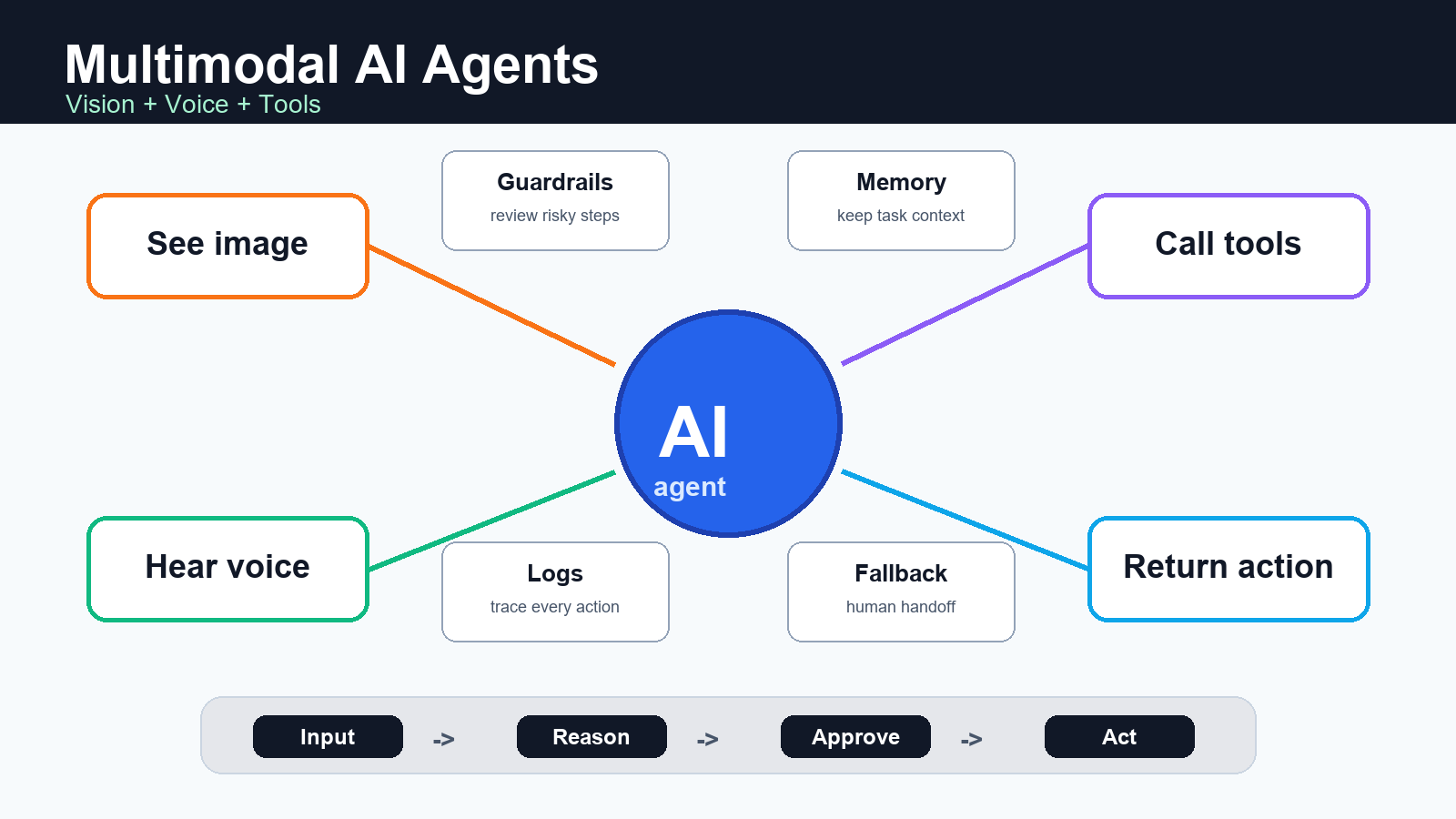
Multimodal AI agents are AI assistants that can understand more than text, reason across inputs such as images and audio, and call software tools to complete a task. For creators, marketers, developers, and AI tool users, the practical value is simple: the agent can look at a screenshot, listen to a user, fetch or update data, and return an action instead of only writing a chat response.
Details checked on July 10, 2026 against official OpenAI, Google, and Anthropic documentation. Availability, model names, and pricing can change, so verify production decisions against the current provider docs before launch.
What is a multimodal AI agent?
A multimodal AI agent is an agentic system that combines three capabilities: multimodal understanding, task planning, and tool execution. Multimodal understanding lets it process images, audio, video frames, documents, or text. Task planning lets it decide the next step. Tool execution lets it call APIs, search a knowledge base, update a CRM, generate an asset, or ask a human to approve a risky action.
The difference from a normal chatbot is the action layer. A chatbot may answer, ?Here is what I see in this product image.? A multimodal agent can inspect the image, detect missing listing information, draft a product title, generate alt text, check a price sheet, and prepare an ecommerce update for review.
Official capabilities to know in 2026
Modern provider docs show a clear direction: agents are becoming tool-connected, observable, and increasingly multimodal. OpenAI?s Agents SDK documentation describes managed agent loops, tool calls, handoffs, sessions, tracing, guardrails, and approval flows for workflows that need more orchestration than a single model call. Google?s Gemini Live API documentation describes low-latency voice and vision interactions with continuous streams of audio, images, and text, plus tool use for dynamic interactions. Anthropic?s Claude platform documentation describes tool use, where Claude can request structured tool calls, and vision input through image content blocks.
For builders, this means the agent design question is no longer ?Can the model understand this input?? It is ?What tools can the model use, what should it be allowed to do, and how will we audit each action??
Core building blocks
1. Inputs: text, image, audio, files, and screen state
The input layer decides what the agent can perceive. A customer support agent might receive chat text, a product photo, and order metadata. A video production agent might receive a script, brand examples, a voice note, and a timeline screenshot. A developer agent might receive issue text, logs, screenshots, and code files.
Do not add every modality just because it is available. Each extra input type increases testing, privacy review, and failure modes. Start with the modalities that clearly improve the workflow.
2. Reasoning and routing
The reasoning layer decides whether the agent should answer directly, call a tool, ask for clarification, delegate to another specialist, or stop for approval. In a production workflow, this layer should be constrained by instructions, structured outputs, and a small number of well-described tools.
Good routing rules are specific. For example: ?If the image contains a price, compare it with the product database before writing marketing copy.? That is safer than ?Use tools when needed,? because it gives the agent a concrete trigger.
3. Tools and APIs
Tools are the agent?s hands. They may include search, database lookup, file retrieval, code execution, image generation, calendar actions, CRM updates, ecommerce admin APIs, or internal business systems. The tool description is part of the product: if the description is vague, the agent may call the tool at the wrong time or with the wrong arguments.
Use narrow tools with clear schemas. A tool named update_product_listing with required fields for SKU, title, description, and approval status is easier to control than a broad tool named run_admin_action.
4. Guardrails, approvals, and logs
Multimodal agents can act faster than humans, which makes approval and audit design essential. Use human review for destructive actions, payments, publishing, customer-impacting messages, compliance decisions, and anything involving sensitive data. Log model inputs, tool calls, tool outputs, approval decisions, and final actions in a way your team can inspect later.
Practical use cases for creators and marketers
| Use case | What the agent sees or hears | Useful tool action | Human review needed? |
|---|---|---|---|
| Product listing optimization | Product photo, old title, competitor notes | Draft SEO title, alt text, tags, and description | Yes, before publishing |
| Ad creative QA | Banner image, campaign brief, brand rules | Flag text issues, missing CTA, wrong dimensions | Usually yes |
| Video script assistant | Voice note, storyboard, product page | Generate shot list and caption plan | Yes, before final render |
| Support triage | Customer message, screenshot, order state | Classify issue and prepare reply | For refunds or escalations |
| Developer QA | Bug report, browser screenshot, logs | Create issue summary and reproduction checklist | For code changes |
Architecture checklist
Use this checklist before you ship a multimodal agent into a real business workflow:
- Define the job: write the exact workflow the agent owns and the tasks it must refuse.
- Limit tools: expose only the tools needed for the workflow, with strict JSON schemas.
- Separate read and write actions: allow lookup tools broadly, but gate publishing, deletion, payment, and customer messages.
- Add confidence rules: require the agent to ask for help when the image, audio, or source data is unclear.
- Trace every step: store inputs, tool calls, outputs, approvals, and final actions.
- Test edge cases: blurry screenshots, noisy audio, prompt injection in images, outdated files, duplicate records, and conflicting instructions.
- Design fallback: route risky or ambiguous cases to a human with a short summary and suggested next action.
Prompt and workflow tips
Multimodal agents work best when prompts describe the task, allowed tools, approval rules, and output format. Avoid giving the agent a broad personality prompt and hoping it chooses correctly.
Example system instruction
You are a product content assistant for an ecommerce team.
Use image understanding to inspect the product photo.
Use the product database tool before making factual claims about price, size, material, or stock.
Never publish changes directly. Return a draft and a checklist for human approval.
If the image is blurry or the product is uncertain, ask for a better image.
Example user workflow
Review this product image and current listing.
Find missing SEO fields, write a better product description,
and prepare image alt text for a WordPress post.
Do not invent dimensions, materials, discounts, or warranty terms.
The most important instruction is the last one: do not invent facts. A multimodal model can infer a lot from an image, but product claims, pricing, legal claims, medical claims, and availability should come from an official database or human confirmation.
Pros and cons
| Pros | Cons |
|---|---|
| Handles screenshots, images, audio, text, and files in one workflow. | Harder to test than a text-only chatbot. |
| Can call tools and complete multi-step work. | Tool permissions can create real business risk. |
| Reduces handoffs between creator, marketer, support, and developer tools. | Requires careful logging, approval, and privacy controls. |
| Useful for real-time voice and visual interfaces. | Streaming voice and video can increase infrastructure complexity. |
Security and privacy risks
The biggest risk is not that the agent gives a bad answer. The bigger risk is that it takes a bad action with real permissions. Treat every tool as a permission boundary. Read-only tools are lower risk. Write tools, payment tools, publishing tools, and customer communication tools need approvals, rate limits, and logs.
Multimodal inputs also create privacy issues. Screenshots may contain customer names, emails, internal dashboards, API keys, or financial data. Voice recordings may contain personal information. Before sending data to any model provider, check your data policy, provider terms, retention settings, and regional requirements.
Edit AI videos here
If your multimodal workflow creates scripts, captions, voiceovers, or short ad concepts, the next step is editing the final video asset. You can edit AI videos here: https://ai.alphatechnologies.vn. It is a practical place to turn agent-generated ideas into polished clips for campaigns, product pages, and social posts.
How to choose the right approach
Choose a simple multimodal prompt when the task is low risk and only needs a draft. Choose an agent with tools when the workflow needs database lookup, file search, CRM updates, ecommerce data, or repeated steps. Choose a real-time voice or vision architecture only when latency matters, such as live support, field work, training, or interactive product demos.
For most teams, the best first project is not a fully autonomous agent. It is a supervised assistant that reads a screenshot or product image, calls one or two read-only tools, drafts the next step, and asks for approval before anything is published.
Official sources checked
- OpenAI Agents SDK documentation
- OpenAI tools guide
- Google Gemini Live API documentation
- Google Gemini function calling documentation
- Anthropic Claude tool use documentation
- Anthropic Claude vision documentation
Conclusion
Multimodal AI agents are most useful when they connect perception to action: seeing an image, hearing a request, checking source data, calling the right tool, and producing a reviewable result. The winning implementation is not the one with the most modalities. It is the one with the clearest job, narrow tools, strong approval rules, and reliable logs.
Explore more AI tools and workflow guides on Aikolhub to compare models, creative tools, voice apps, video tools, and practical AI systems for creators, marketers, and developers.
FAQ
What is a multimodal AI agent?
A multimodal AI agent is an AI system that can process inputs such as text, images, audio, or files and then use tools or APIs to complete a workflow.
How is it different from a chatbot?
A chatbot mainly answers in text. A multimodal agent can inspect non-text inputs, decide what to do next, call tools, and prepare or complete actions.
Can multimodal agents publish content automatically?
They can if connected to publishing tools, but automatic publishing should require strict rules, logs, and human approval for brand, legal, or factual risk.
What tools should a first agent use?
Start with read-only tools such as product lookup, file search, content retrieval, or analytics lookup. Add write actions only after the workflow is tested.
Are voice and vision agents expensive?
Costs depend on the provider, model, audio or video duration, token usage, and tool calls. Always check official pricing pages before estimating production cost.
What is the safest first use case?
The safest first use case is a supervised draft workflow, such as image alt text, product description suggestions, support triage, or ad creative QA.