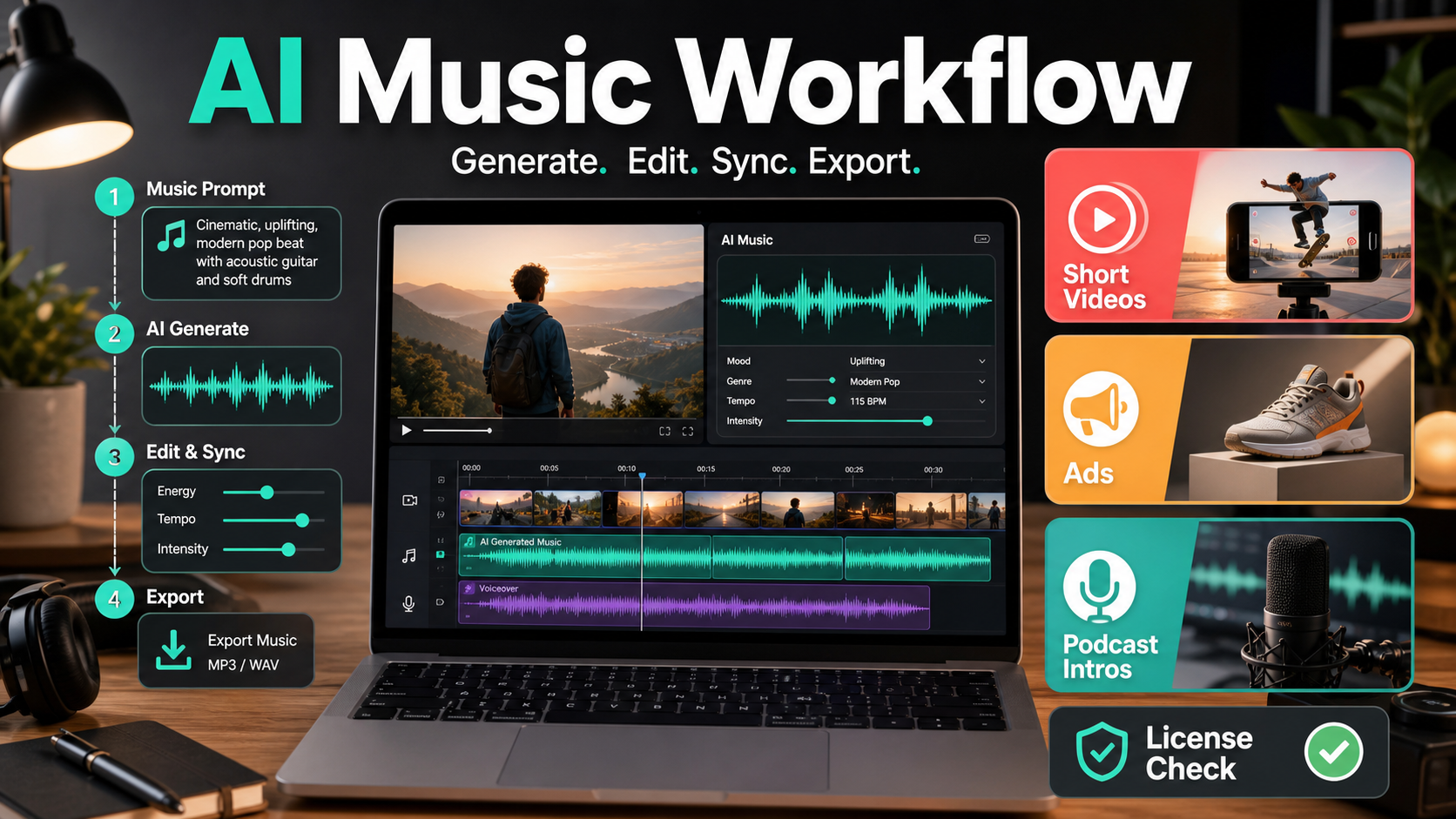
AI music is useful when you need fast, editable background tracks for short videos, ad variations, podcast intros, demos, and creator campaigns. As of June 27, 2026, the safest workflow is not simply to generate a catchy song. It is to choose the right output length, keep prompts brand-safe, export stems or clean audio when available, and verify the license for the exact plan used to create the track.
This guide compares practical AI music workflows for creators, marketers, developers, and AI tool users. It focuses on production decisions: when to use a full song, when to use a loop, how to prompt for different channels, and what to check before using AI-generated music in a commercial project.
What AI music is best for
AI music works best for fast ideation, background scores, short branded stings, intro beds, mood boards, and multiple creative variations. It is less reliable when you need a legally complex release, a famous-artist soundalike, a perfect lyric performance, or a track that must match a strict broadcast music cue sheet without review.
For everyday content teams, the biggest advantage is speed. You can create ten music directions for a 30-second product clip before a traditional licensing search is finished. The biggest risk is overconfidence: commercial rights, downloads, attribution, and allowed use can differ by provider, subscription tier, beta feature, and whether the asset was generated while a paid plan was active.
AI music workflow by use case
Start with the content format, not the tool. A TikTok background bed, a direct-response ad, and a podcast intro each need different structure, loudness, length, and licensing discipline.
| Use case | Best music shape | Prompt goal | Key check |
|---|---|---|---|
| Short videos | 8-30 second loop or punchy bed | Immediate hook, simple beat, no distracting vocals | Can you trim cleanly and loop without a click? |
| Paid ads | 15, 30, or 60 second structured cue | Brand mood, clear energy arc, space for voiceover | Does your plan allow commercial advertising use? |
| Podcast intros | 5-20 second branded sting | Memorable motif, clean ending, consistent tone | Can you reuse the same cue across episodes? |
| Product demos | Low-volume ambient bed | Support narration without stealing attention | Does it mask speech or clash with UI sounds? |
| Social templates | Loopable stems or repeatable style | Reusable content identity across posts | Can your team document prompt and license history? |
Tool and license checks before you publish
The practical rule is simple: check the official plan page and terms before using a generated track in a public or paid project. AI music companies update their products quickly, and a track made under one plan may not have the same rights as a track made under another plan.
Suno
Suno’s official pricing page lists paid plans with commercial use rights for new songs made under those plans. Suno’s help pages also distinguish free-plan personal use from paid-plan commercial use. For marketers, that means you should document whether the track was made while the account had the relevant paid subscription, and you should avoid assuming that upgrading later retroactively changes the rights for earlier generations unless Suno’s official terms say so.
Udio
Udio provides official pricing and terms pages, but teams should read the current terms directly before campaign use because rights, downloads, and platform rules can change. For a client campaign, do not rely on screenshots, old forum answers, or third-party summaries. Save the date, plan, and official terms URL in your campaign folder.
ElevenLabs Music
ElevenLabs describes Eleven Music as a text-to-music model and documents music generation through its API. Its official pages also discuss commercial use and plan-based limits. This makes it especially relevant for developers or production teams that want API-driven music generation, but you still need to confirm the current plan limits, download rules, and whether a specific feature is generally available or covered by beta terms.
Prompt formulas that work
Good AI music prompts are specific about role, structure, emotion, instruments, and what to avoid. Do not prompt only for genre. Prompt for how the track will sit under video, voice, or brand motion.
Short video prompt
Use this when the music must grab attention quickly without overpowering captions:
Create a 20-second instrumental music bed for a vertical short video about a new productivity app. Mood: optimistic, modern, energetic but not aggressive. Instruments: light electronic beat, warm bass, soft synth plucks. Structure: strong first two seconds, steady middle, clean ending. Avoid vocals, dramatic drops, distorted bass, and anything that sounds like a famous song.Ad prompt
Use this when a voiceover and product message need room:
Create a 30-second commercial background track for a clean tech product ad. Mood: confident, premium, forward-moving. Keep the midrange open for voiceover. Use subtle drums, soft piano, modern synth texture, and a small lift at 20 seconds. No vocals, no lyrics, no recognizable artist style, no sudden volume jumps.Podcast intro prompt
Use this when you want a reusable identity cue:
Create a 12-second podcast intro sting for a show about AI tools and creative workflows. Mood: smart, friendly, modern. Instruments: short synth motif, soft percussion, warm bass. Structure: memorable opening motif, two-bar build, resolved final note. No vocals, no lyrics, no cinematic trailer hits.Production checklist for AI music
After generation, treat the track like raw material. The best results usually come from editing, mixing, trimming, and checking it against the final content.
- Trim for intent: cut dead intros and keep the first beat aligned with the first visual change.
- Leave room for speech: reduce music around 1-4 kHz if narration is important.
- Export clean versions: keep full mix, instrumental, loop, and short sting versions when possible.
- Check loudness: normalize for the destination platform instead of trusting the generator output.
- Avoid soundalikes: never ask for a living artist, famous band, copyrighted song, or protected brand style.
- Document provenance: save prompt, generation date, tool, plan, account, license page, and final file name.
Pros and cons for creators and marketers
AI music is not a replacement for every musician, composer, or licensed catalog. It is a fast production layer. Use it where speed, variation, and custom fit matter more than star power or fully bespoke composition.
| Pros | Cons |
|---|---|
| Fast variation for many hooks, moods, and cuts | Licensing terms require careful checking by plan and date |
| Useful for social videos, mockups, ads, and podcasts | Outputs can sound generic without strong prompting |
| Can reduce time spent searching stock music | Lyrics and vocals may need extra review |
| Developers can automate music creation with API-capable tools | Not every popular AI music tool has the same API or commercial workflow |
| Good for rapid brand mood exploration | Famous-artist or soundalike prompts create unnecessary legal risk |
How developers should think about AI music APIs
Developers should design AI music features around auditability, rate limits, and content safety. A music generation button inside a video editor is only useful if the app can store generation metadata, enforce prompt rules, and show users what rights or plan limits apply.
For a production app, add a license status field to every generated asset. Store the prompt, provider, model or product name when officially exposed, generation timestamp, account tier, download URL, and user consent. If the provider supports streaming or long music generation parameters, validate duration and file size before sending the request. If the provider does not officially support the API behavior you need, do not build a product on an unofficial wrapper without understanding reliability and terms risk.
Edit AI videos here
AI music becomes more useful when you can test it directly against the final video. After generating a track, import it into your edit, sync it to scene changes, duck it under narration, and export a short test cut. You can edit AI videos and creative clips here: https://ai.alphatechnologies.vn.
Recommended workflow
For most creators, the best workflow is: generate three music directions, pick one based on the edit, trim it to the exact timeline, mix it under voice or captions, then run a final license check before publishing. For paid ads or client work, add one more step: save evidence of the official plan and terms used on the generation date.
For developers, start with API-capable providers and build a review queue before public export. For marketers, create a small internal prompt library by format: short video hook, product ad bed, podcast sting, launch trailer, and explainer background. This keeps output consistent and prevents every team member from starting from scratch.
FAQ
Can I use AI music in commercial ads?
Yes, but only if the provider’s current plan and terms allow commercial use for the track you generated. Check the official terms before using AI music in paid ads.
Should I use vocals in AI music for short videos?
Use vocals only when the lyrics are part of the creative idea. For most product clips, tutorials, and ads, instrumental tracks are safer and easier to mix under speech.
How long should a podcast intro be?
A podcast intro should usually be 5-20 seconds. Keep it short, memorable, and easy to fade under the host’s first sentence.
What should I avoid in AI music prompts?
Avoid famous artist names, copyrighted song titles, brand names, protected character references, and instructions to imitate a specific living performer.
Is AI music better than stock music?
AI music is better for fast custom variation. Stock music may still be better when you need a familiar licensing model, human performance quality, or a curated catalog track.
What is the safest way to manage AI music files?
Keep the final audio file together with the prompt, tool name, generation date, plan, license URL, and project name. That record is essential for client and ad reviews.
Conclusion
AI music is now a practical part of the creator stack, especially for short videos, ads, demos, and podcast branding. The teams that get the most value use it as an editable production workflow, not a magic one-click soundtrack. Generate quickly, edit carefully, avoid soundalikes, and verify rights before the asset goes public.
For more practical AI workflows, explore AI tools, audio utilities, and creative production guides on Aikolhub.