


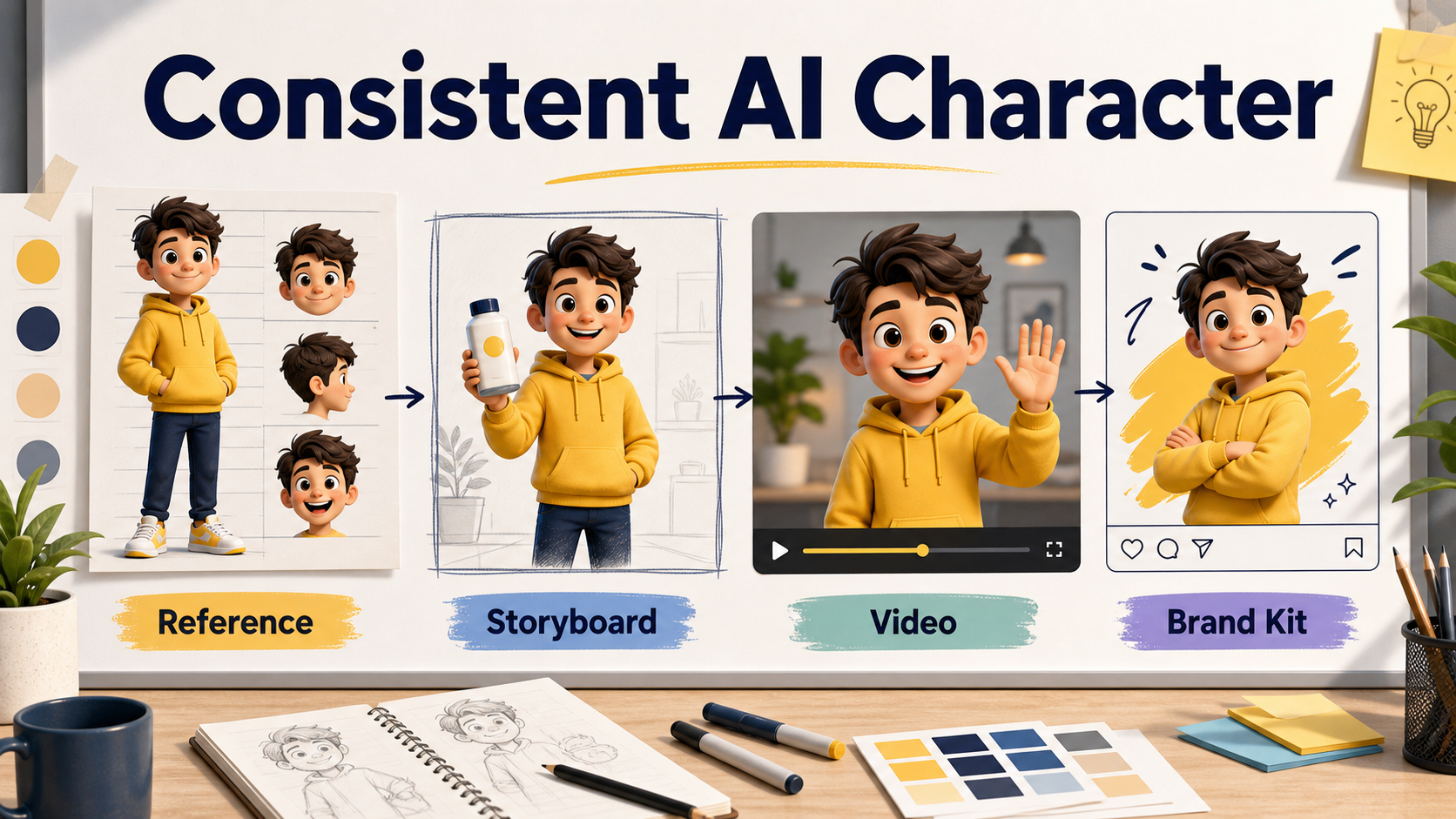
A consistent AI character workflow helps creators keep the same face, outfit, color palette, and brand personality across images, storyboards, and short videos. The practical answer is to start with a strong reference sheet, reuse the same descriptive character bible, control scene changes one variable at a time, and move into video only after the still-image identity is stable.
Updated on June 26, 2026, this guide is based on current official documentation from OpenAI, Google, Runway, and Black Forest Labs. The important trend is clear: modern image and video models increasingly support reference images, multi-image editing, and image-to-video workflows, but no official source guarantees perfect character consistency in every scene. Treat consistency as a managed production workflow, not a magic button.
What is a consistent AI character?
A consistent AI character is a fictional person, mascot, avatar, or branded figure that remains recognizable across different outputs. The eyes, face shape, hairstyle, clothing, body proportions, color palette, and personality should feel stable even when the camera angle, pose, lighting, or background changes.
For creators and marketers, this matters because one-off AI images are easy to make, but a campaign needs repeatable identity. A YouTube Shorts mascot, product explainer host, comic protagonist, course avatar, or SaaS onboarding guide must look like the same character over time. If the character changes too much between posts, the audience loses trust and the brand loses recall.
Official model capabilities to know in 2026
Official docs show that reference-based generation is now a mainstream feature, but each platform uses different controls and limits. Use the table below as a planning guide, then check the provider docs again before production because model names, prices, and limits can change.
| Platform | Officially documented capability | Useful for character consistency |
|---|---|---|
| OpenAI | GPT Image models can generate and edit images from text and image inputs; Sora can create video from natural language or images. | Character sheets, image edits, first-frame style planning, and image-to-video experiments. |
| Google Gemini and Veo | Gemini image generation supports reference images, and Veo docs describe reference images or ingredients for video content. | Combining character references with product, setting, or scene references. |
| Runway | Runway Gen-4 references are documented for using one or multiple images to create new images with characters, styles, objects, or environments. | Creator workflows that need repeated characters across scenes and production boards. |
| Black Forest Labs | FLUX.2 documentation describes multi-reference image editing and FLUX.1 Kontext documentation includes character consistency use cases. | Image campaigns, product mascots, and controlled editing with multiple references. |
The safe takeaway is this: current tools can help preserve identity, but you still need source control. Keep your original references, prompts, seed notes when available, rejected outputs, final selects, and post-editing decisions in one project folder.
Build a character bible first
The best consistency work starts before generation. A character bible is a short production document that defines the character in words and images. It prevents you from rewriting the character every time you make a new scene.
Include these details
- Name or internal codename, such as Yellow Hoodie Guide or Pixel Chef.
- Age range, body type, face shape, hairstyle, eye color, and signature expression.
- Primary outfit, backup outfit, shoe style, accessories, and colors.
- Personality: helpful, calm, funny, premium, playful, technical, or educational.
- Allowed settings: studio, office, product table, classroom, street scene, or app interface.
- Forbidden changes: no logo, no different hair color, no age shift, no extra fingers, no new costume unless requested.
For brand work, also define what the character should never do. A financial education mascot may avoid exaggerated luxury imagery. A health creator avatar may avoid medical claims. A kids learning character may need safer poses, softer expressions, and no realistic celebrity resemblance.
Create reference images before video
Still images are cheaper and easier to inspect than video. Generate or design a character reference sheet first, then create campaign images, and only then animate selected frames. This order gives you a stable visual anchor.
Recommended reference sheet
- Front view, three-quarter view, and side view.
- Neutral expression, smile, and surprised expression.
- Full body plus close-up face crop.
- One clean outfit with limited colors.
- Plain background so the model focuses on the character, not the environment.
Do not overload the first prompt with a complex movie scene. Ask for a simple reference sheet with large, clear views. Once the model establishes the character, use that reference sheet as an input for scenes, ad visuals, thumbnails, and storyboard panels.
Prompt workflow for consistent images
The prompt should separate identity from scene direction. Keep the identity block unchanged, then change only the scene block. This makes it easier to diagnose why an output drifted.
Prompt template
Character identity: same fictional mascot from the reference image, young friendly creator guide, round face, warm brown eyes, wavy brown hair, yellow hoodie, navy pants, white sneakers, cheerful but natural expression. Preserve face shape, hairstyle, outfit colors, body proportions, and personality.Scene request: place the character in a bright product photography studio holding a plain white skincare bottle. Use a clean commercial layout, soft daylight, medium shot, realistic hands, no logo, no random text, no change to the character outfit.For a second image, keep the first paragraph identical and change only the scene request. For example, move from product studio to tutorial desk, landing page hero, podcast cover, or behind-the-scenes storyboard. If you change identity and scene at the same time, you will not know which instruction caused the drift.
Workflow for AI video scenes
Video adds motion, timing, camera movement, and frame-to-frame continuity. Start with one approved still image as the first frame or key reference. Then ask for simple motion: wave, turn toward camera, hold product, walk two steps, or point at a screen.
Short clips are easier to control than long scenes. A five-to-eight-second product intro with one motion is usually more reliable than a complex narrative shot with multiple camera moves. If the tool supports first and last frames, create both frames as still images first so the motion has clearer boundaries.
Video prompt checklist
- Use the approved character reference or first frame.
- Describe one main action only.
- Lock the outfit, hair, face, and colors.
- Keep camera movement simple: slow push-in, static medium shot, or gentle pan.
- Use a short duration for first tests.
- Review face, hands, clothing, product shape, and background continuity before upscaling.
If the model changes the character mid-clip, reduce the motion, simplify the background, or go back to still images and create a stronger keyframe. Consistency failures usually come from asking for too much transformation in one generation.
Use cases for creators and marketers
A consistent AI character is especially useful when your audience sees many small pieces of content over time. The character becomes a visual shortcut for your brand promise.
| Use case | Best format | Tip |
|---|---|---|
| Social media education series | Carousel images and short clips | Keep the same pose family and color palette. |
| Product ads | Image-to-video clips | Use the character as a guide, not as a fake customer testimonial. |
| Course content | Slides, thumbnails, and explainers | Create expressions for confusing, solved, and celebrating moments. |
| Brand mascot | Landing pages and support content | Document every approved visual rule in a brand kit. |
| Developer demos | Storyboards and UI walkthroughs | Use the character to explain flows without crowding the interface. |
Pros and cons
Pros: consistent characters improve brand recall, make campaigns feel planned, reduce production time after the first setup, and help small teams create repeatable visual assets without a full studio.
Cons: identity can drift, hands and faces still need review, reference-image features vary by provider, commercial rights depend on the tool and source materials, and realistic people can create consent and likeness risks. Avoid using real private individuals, celebrities, copyrighted characters, or brand logos unless you have clear permission.
Edit AI videos here
After generating character clips, creators usually need to trim scenes, add captions, insert product shots, localize text, and prepare social formats. You can edit and assemble AI video outputs here: https://ai.alphatechnologies.vn. A practical workflow is to generate several short character clips, choose the most stable takes, then use the editor to build a polished final video with subtitles, music, and calls to action.
Final checklist before publishing
- Does the character look like the same person or mascot across all assets?
- Are the outfit, colors, and facial features stable?
- Did you avoid unlicensed logos, celebrity likenesses, and copyrighted characters?
- Is any AI-generated text readable and accurate?
- Did you save the prompt, reference images, final images, and video settings?
- Does the final output match your brand tone and audience expectations?
Conclusion
The best way to create a consistent AI character is to treat the work like a small production system: define the character, create reference sheets, generate stills first, animate only approved frames, and keep a tight record of prompts and final assets. The technology is improving quickly, but the workflow still matters.
For more practical AI workflows, model updates, and creator tools, explore AI tools on Aikolhub and compare the options that fit your content, marketing, and development pipeline.
FAQ
Can AI keep the same character across many images?
Yes, many current tools can use reference images to improve consistency, but results are not perfect. Use a reference sheet, stable prompts, and manual review.
Should I start with images or video?
Start with images. Still images are easier to control, compare, and approve before moving into image-to-video generation.
How many reference images do I need?
One strong reference sheet can work for simple tests. For production, use multiple clean views and expressions when the selected tool supports them.
Can I use a real person as an AI character?
Only use a real person if you have clear consent and rights. Avoid celebrity likenesses and private individuals without permission.
What causes AI character drift?
Drift usually comes from weak references, changing too many prompt details, complex camera motion, long clips, or asking the model to alter outfit, pose, and setting at once.
Do I still need video editing after generation?
Yes. Editing is usually needed for captions, pacing, music, aspect ratios, branding, and replacing unstable takes with better clips.


1 Comment