RAG with open-source LLMs lets you build a chatbot that answers from your own documents without retraining a model. The practical stack is simple: load files, split them into chunks, create embeddings, store vectors, retrieve passages, and ask a local or self-hosted LLM to answer with citations. This guide was checked against official documentation on July 8, 2026.
For creators, marketers, developers, and AI tool teams, RAG is useful when generic chatbots are not enough. A private document chatbot can answer questions about brand guidelines, product specs, campaign notes, SOPs, contracts, course material, or support docs while keeping the answer grounded in source material.
What is RAG with open-source LLMs?
Retrieval-augmented generation, or RAG, adds a retrieval step before generation. Instead of asking the LLM to rely only on its training data, the app searches your knowledge base, inserts relevant passages into the prompt, and asks the model to answer from that context.
Official LlamaIndex documentation describes RAG as a workflow where your data is loaded, indexed, queried, filtered down to relevant context, and then sent to the LLM with the user query. LangChain documentation similarly presents RAG as a way to build question-answering apps over specific source information.
When should you use RAG instead of fine-tuning?
Use RAG when facts change often, when you need citations, or when content already exists in documents. Use fine-tuning when you want to change style, format, classification behavior, or domain-specific response patterns. Many production systems use both, but RAG should usually come first for private document Q&A.
| Goal | Best first choice | Why |
|---|---|---|
| Answer from PDFs, docs, policies, or support pages | RAG | The chatbot can retrieve source passages and cite them. |
| Keep up with weekly product changes | RAG | You update the index, not the model weights. |
| Imitate a strict writing style | Fine-tuning or strong prompting | Retrieval alone does not teach a model a new behavior. |
| Classify repetitive internal tickets | Fine-tuning or small specialist model | The task pattern is stable and measurable. |
| Reduce hallucinations in knowledge answers | RAG plus evaluation | Retrieved evidence gives the model a source to follow. |
The basic architecture
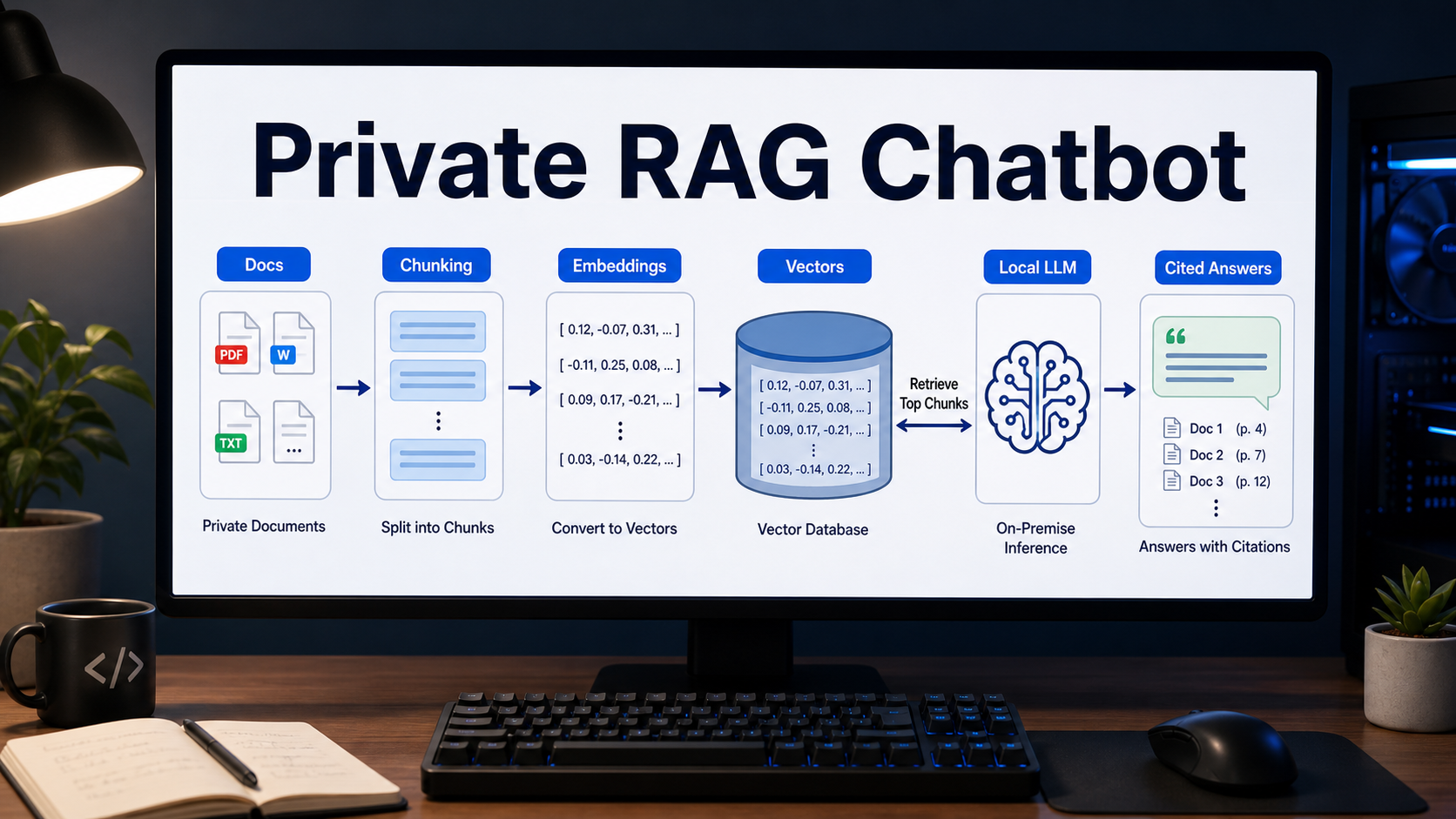
A private RAG chatbot has six main parts: data loading, chunking, embeddings, vector storage, retrieval, and answer generation. You can swap tools in each layer, but the flow stays mostly the same.
1. Load your documents
Start with a narrow content set: 20 to 100 high-value documents is enough for a first version. Good sources include product manuals, pricing notes, onboarding docs, FAQ pages, help center articles, campaign briefs, call transcripts, and internal SOPs.
Clean the files before indexing. Remove duplicate headers, cookie banners, irrelevant navigation text, and old versions. RAG quality depends heavily on the source text. If your documents are messy, the chatbot will retrieve messy context.
2. Split content into chunks
Chunking turns long documents into smaller units that can be searched and inserted into prompts. A useful starting point is 400 to 900 tokens per chunk with 50 to 150 tokens of overlap, but this is not universal. Short FAQs may work better as one question-answer pair per chunk. Legal or technical docs may need section-aware chunks that preserve headings.
Chroma’s official build guidance emphasizes designing chunking and collection strategy around the searches you want to support. That is the right mindset: ask what users will search for, then make chunks that contain enough context to answer those questions.
3. Generate embeddings
Embeddings convert text into numeric vectors that capture meaning. During search, the user’s question is embedded and compared with stored document vectors. Ollama’s official embeddings documentation says embeddings can be stored in a vector database, searched with cosine similarity, and used in RAG pipelines.
For a local-first prototype, you can test models available through Ollama, such as embedding-focused models listed in its documentation. For a lightweight sentence-transformers option, the Hugging Face model card for sentence-transformers/all-MiniLM-L6-v2 states that it maps sentences and paragraphs to a 384-dimensional dense vector space for semantic search and related tasks. Always verify the model card, license, language coverage, and maximum input length before adopting an embedding model.
4. Store vectors in a database
A vector database stores embeddings, metadata, and document references so your app can retrieve relevant chunks quickly. Chroma is convenient for local prototypes and smaller internal apps. Qdrant is a strong option when you want a dedicated open-source vector search engine with local, server, or cloud deployment options.
| Vector store | Good fit | What to verify |
|---|---|---|
| Chroma | Local prototypes, notebooks, lightweight document apps | Persistence, metadata filters, deployment pattern, embedding function |
| Qdrant | Production search, larger collections, self-hosted vector retrieval | Index settings, payload filters, memory use, backup and scaling plan |
| Postgres with vector extension | Teams already standardized on Postgres | Query speed, indexing strategy, operations ownership |
| Managed vector service | Teams that prefer less infrastructure work | Data residency, cost, export path, security controls |
5. Retrieve the right context
Retrieval is not just top-k similarity search. Good RAG systems often combine metadata filters, hybrid keyword plus vector search, reranking, and source-specific routing. For example, a chatbot for marketers might route brand questions to brand guidelines and pricing questions to the latest pricing table.
Start with top 4 to 8 chunks. If answers are vague, inspect the retrieved passages. If the right answer is not in the retrieved context, improve chunking, metadata, query rewriting, or reranking before blaming the LLM.
6. Generate answers with citations
The final prompt should instruct the LLM to answer only from retrieved context, cite source names, and say when the answer is not found. Citations make the chatbot easier to trust, easier to debug, and safer for business users.
You are a private document assistant.
Answer only from the provided context.
Cite the source title and section for each factual claim.
If the context does not contain the answer, say: "I could not find that in the indexed documents."
Keep the answer concise and include next-step links when available.
A practical open-source stack
There is no single best RAG stack. The right choice depends on privacy, latency, document volume, budget, and your team’s deployment skills. A pragmatic local-first stack is LlamaIndex or LangChain for loading, section-aware chunking, Ollama or sentence-transformers for embeddings, Chroma for a prototype, Qdrant for stronger production retrieval, and a local or self-hosted LLM for answer generation.
Build workflow: from prototype to useful chatbot
The fastest path is to build a small, measurable prototype before indexing everything. Pick one document category and one user role, such as a sales chatbot that answers from the latest product FAQ and pricing policy.
- Define the answer policy: require source-only answers, citations, and a clear refusal when the source does not support the claim.
- Create a gold test set: prepare 30 to 50 real questions, including ambiguous questions and questions that should return ?not found.?
- Index trusted sources: add metadata such as title, owner, updated date, version, department, and permission group.
- Inspect retrieval first: log retrieved chunks before calling the LLM. If retrieval fails, prompt tuning will not fix the system.
- Add the answer prompt: ask for direct answers, citations, uncertainty handling, and concise formatting.
- Plan re-indexing: active product, pricing, and support docs should use daily or event-based indexing.
Quality checklist before launch
A RAG chatbot is ready for a limited pilot when it consistently retrieves the right sources and refuses unsupported questions. Use this checklist before giving it to a broader team.
- Every answer includes source citations or says the answer was not found.
- Old and duplicate documents are removed or clearly marked as archived.
- Permission-sensitive documents are filtered before retrieval, not after answer generation.
- At least 30 real questions have been tested and reviewed by a domain owner.
- The chatbot logs user question, retrieved chunk IDs, model answer, and feedback.
- There is a process for updating documents and rebuilding embeddings.
- The prompt prevents unsupported pricing, legal, medical, or policy claims.
Common mistakes
The most common RAG mistake is indexing too much too early. More documents can make retrieval worse if the documents are stale, duplicated, or poorly chunked. Start narrow, measure quality, then expand.
Pros and cons of private RAG
| Pros | Cons |
|---|---|
| Answers can be grounded in internal documents | Quality depends on clean source material |
| Citations make review and debugging easier | Chunking and retrieval need ongoing tuning |
| Documents can be updated without retraining | Permissions must be designed carefully |
| Open-source components reduce vendor lock-in | Self-hosting adds operations work |
| Works for support, sales, training, and research | Evaluation is required before broad rollout |
Workflow tips for creators and marketers
RAG is not only for engineers. A content team can search brand guidelines, campaign briefs, buyer personas, SEO research, and video scripts. Keep one approved brand voice document, store campaign facts in short dated briefs, ask the chatbot to cite sources before drafting ads, and keep confidential customer data out of the index unless access controls are solved.
Edit AI videos here
If your RAG chatbot helps turn product documents, support answers, or training materials into scripts, you can continue the workflow by editing AI videos at https://ai.alphatechnologies.vn. Use the chatbot to collect accurate source points, then turn those points into explainer clips, social videos, tutorials, or internal training videos.
Conclusion
RAG with open-source LLMs is one of the most practical ways to build a private document chatbot. Start with trusted documents, tune chunking and retrieval, require citations, and evaluate with real questions before expanding the knowledge base.
For teams comparing AI workflows, Aikolhub can help you explore AI tools for chatbots, content production, video editing, image generation, and automation. The best setup is the workflow that gives your users accurate answers they can verify.
FAQ
Can I build RAG fully offline?
Yes, if you use local document storage, local embeddings, a local vector database, and a local LLM. You still need to verify each model’s license and hardware requirements.
Do I need a vector database for RAG?
For most document chatbots, yes. A vector database or vector-capable storage layer makes semantic retrieval practical. Very small projects can start with an in-memory index, but persistence becomes important quickly.
Which open-source LLM is best for RAG?
There is no universal best model. Choose based on language support, context length, license, hardware, answer quality, and your test set. Retrieval quality often matters more than changing the LLM.
How do I reduce hallucinations in a RAG chatbot?
Retrieve better context, require citations, tell the model to answer only from context, and test “not found” questions. Also remove outdated or duplicate documents from the index.
Should marketing teams use RAG?
Yes. Marketing teams can use RAG to answer from brand guidelines, product facts, campaign briefs, and customer research before drafting emails, landing pages, videos, and ads.
How often should I re-index documents?
Re-index whenever important source documents change. For active product, pricing, or support content, use daily or event-based indexing rather than waiting for a manual rebuild.