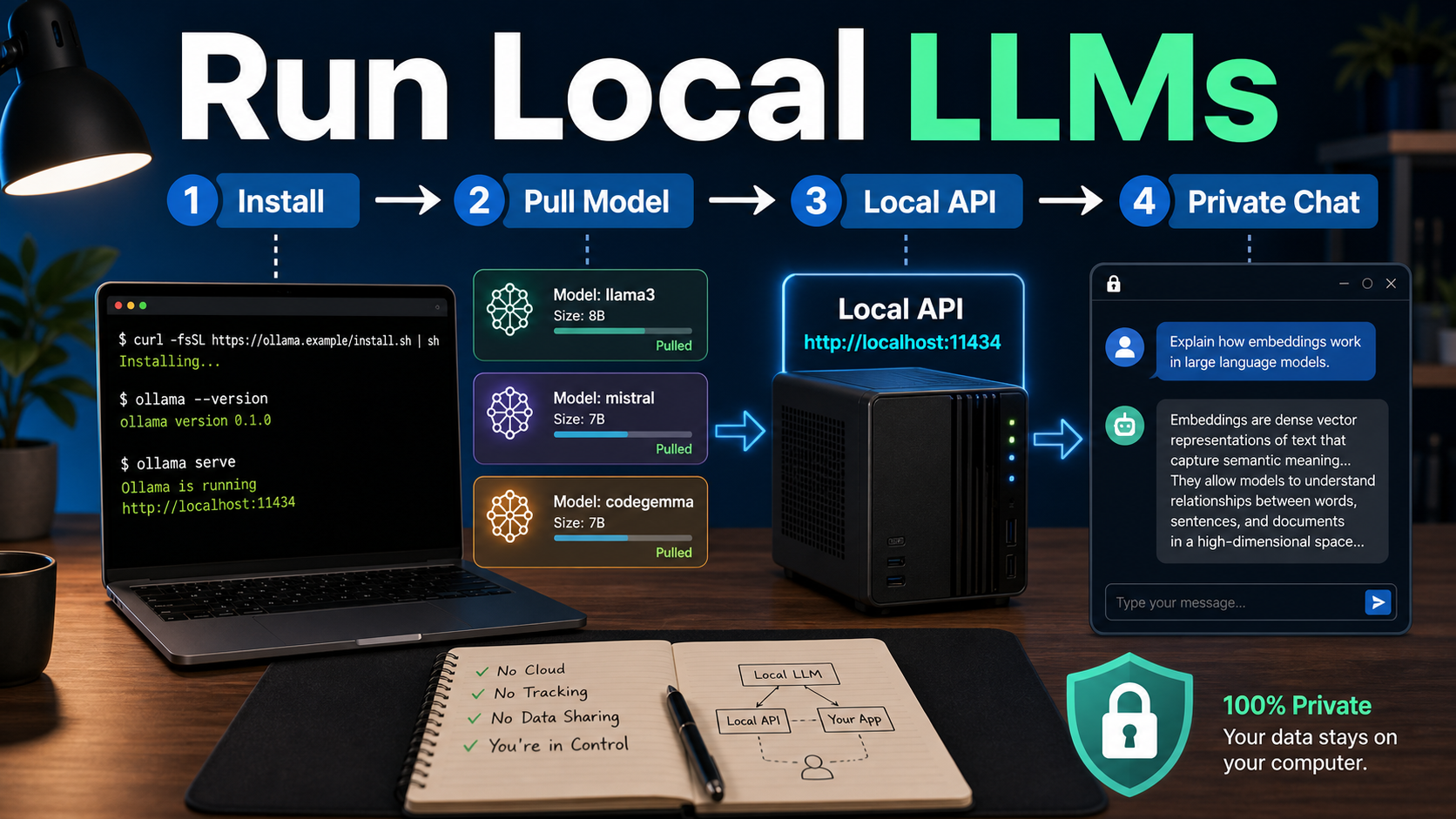
Ollama is a local AI runtime that lets you download, run, and connect open-source large language models on your own computer. As of June 25, 2026, the official Ollama docs list support for macOS, Windows, and Linux, with a local API served by default at http://localhost:11434/api. For creators, marketers, and developers, that means you can test chatbots, summarize documents, prototype agents, and experiment without sending every prompt to a hosted LLM API.
This guide explains what Ollama does, how to start safely, which model sizes to consider, and where local AI fits into a practical content workflow. It is not a promise that every model is free for every commercial use. Check the model page and license before using outputs in client work, advertising, or production software.
What is Ollama?
Ollama is a tool for running LLMs locally through a simple command-line interface and HTTP API. Instead of writing model-loading code, managing quantized files manually, and configuring a serving layer from scratch, you can install Ollama, pull a model from the Ollama library, and start chatting or making API calls from local applications.
The core idea is simple: your laptop or workstation becomes the model host. A downloaded model runs on your available CPU, GPU, and memory. Your app talks to Ollama locally, usually through localhost. Official documentation also describes cloud model access through ollama.com, but local usage is why most beginners start.
Why run an open-source LLM locally?
Local LLMs are useful when privacy, fast prototyping, offline testing, or predictable experimentation matters more than maximum frontier-model quality. A hosted model may still be better for complex reasoning, huge context windows, strict service-level needs, or multimodal production features. But local AI is often enough for drafts, tagging, internal search, coding helpers, document summaries, and repeatable testing.
| Use case | Why Ollama helps | What to verify |
|---|---|---|
| Private drafting | Prompts can stay on your own machine during local inference. | Check whether your app sends data to any external service. |
| Chatbot prototype | Developers can test prompts and retrieval flows before paying for cloud traffic. | Measure latency and answer quality on real user questions. |
| Document summaries | Good fit for small batches of internal notes, transcripts, and briefs. | Confirm context length and hallucination rate. |
| Content workflow | Creators can generate outlines, rewrite variants, and keyword ideas locally. | Review every factual claim before publishing. |
| Local API experiments | Apps can call a local HTTP endpoint without a hosted API key. | Secure network exposure and avoid sharing sensitive endpoints. |
How to install and run your first model
The shortest path is to install Ollama, open a terminal, and run a model command from the Ollama library. The official quickstart says Ollama runs on macOS, Windows, and Linux. On Windows, the official Windows page says the standard installer is the easiest path and installs in the user account without requiring Administrator rights.
Basic starter workflow
- Download Ollama from the official site for your operating system.
- Open a terminal after installation.
- Choose a model from the official Ollama library.
- Run a command such as
ollama run qwen3:0.6bor another model tag listed on the model page. - Ask a short question first, then test your real workflow prompts.
Model names change over time, so avoid copying random commands from old social posts. Use the exact command shown on the current official model page. For example, the Ollama library pages show commands such as ollama run qwen3.5, ollama run qwen3:0.6b, and ollama pull qwen3-embedding depending on the model family and task.
Choosing the right local model
The best local model is the smallest model that answers your real task well enough on your hardware. Bigger models may improve quality, but they need more memory, storage, and patience. Smaller models are easier for laptops and are often good for classification, simple writing, coding hints, structured extraction, and Vietnamese-English content workflows.
| Model type | Good for | Watch out for |
|---|---|---|
| Small chat models | Fast drafts, labels, summaries, simple agents, low-cost testing. | May miss nuance or hallucinate on expert topics. |
| Reasoning-oriented models | Step-by-step analysis, coding, math, and planning experiments. | Can be slower and may produce longer outputs than needed. |
| Embedding models | Search, RAG, clustering, and knowledge-base retrieval. | They generate vectors, not normal chat answers. |
| Vision or multimodal models | Image understanding workflows when supported by the model/runtime. | Check official capability notes and input requirements. |
For beginner machines, start with a small model and test a real task set: five customer questions, five product descriptions, five meeting snippets, or five coding issues. If the answers are too weak, move up one model size or try a model family designed for your task. The Ollama library currently includes model families such as Llama, Qwen, DeepSeek, Gemma, Phi, Mistral-related models, and embedding-specific models. Availability, tags, and descriptions should be checked on the official library before you publish guidance or build a production dependency.
Using Ollama as a local API
Ollama is not only a chat command; it can serve models to your own tools through a local API. Official documentation says the default local API base URL is http://localhost:11434/api. The docs also state that local access through this address does not require authentication, while authentication is required for cloud models, publishing models, and private model downloads.
That local API makes Ollama useful for developers building small apps, internal content tools, browser extensions, RAG demos, or automation scripts. You can keep your interface simple: a text box, a model selector, a system prompt, and a result panel. Later, if the local model is not strong enough, you can swap part of the workflow to a hosted API while keeping the same evaluation set.
Practical local API checklist
- Keep the Ollama service bound safely for local development unless you intentionally expose it.
- Do not assume local means secure if another app forwards prompts to cloud services.
- Log prompt templates and outputs during testing, but avoid storing private user data unnecessarily.
- Benchmark with the same examples you expect in production.
- Separate chat models from embedding models in your app configuration.
Workflow tips for creators and marketers
Creators should use local LLMs for repeatable drafts, not unchecked final facts. A local model can turn raw notes into hooks, titles, briefs, captions, and outlines quickly. It can also rewrite content for different formats: blog intro, email teaser, YouTube description, TikTok caption, or product FAQ.
Prompt template for content planning
You are a content strategist for an AI tools website.
Task: turn these notes into a practical article outline.
Audience: creators, marketers, developers, and small business teams.
Rules: answer in English, use H2/H3 structure, include use cases, risks, FAQ ideas, and a clear CTA.
Notes:
[Paste your research notes here]
Prompt template for tool testing
Evaluate this local model for a customer support assistant.
Score each answer from 1-5 for accuracy, clarity, helpfulness, and risk.
If a claim is uncertain, mark it as needs verification.
Questions:
1. [Real customer question]
2. [Real customer question]
3. [Real customer question]
This approach helps teams in Vietnam and global markets build bilingual or English-first workflows while keeping early drafts private. The key is to treat the model like a production assistant, not a source of truth.
Pros and cons of Ollama
Ollama is excellent for local experimentation, but it is not a magic replacement for every hosted AI platform. Use it when the tradeoffs match your goals.
| Pros | Cons |
|---|---|
| Simple install and model-running workflow. | Quality depends heavily on model choice and hardware. |
| Local API is convenient for prototypes. | Large models can be slow or impossible on modest laptops. |
| Good for privacy-sensitive drafts and internal experiments. | You still need to check each model license and terms. |
| Useful for RAG demos, content operations, and coding helpers. | Production reliability is your responsibility. |
| Model library makes discovery easier. | Not every model is appropriate for commercial or regulated use. |
Common mistakes to avoid
The biggest mistake is choosing a model because it is popular instead of testing it on your actual task. Another common mistake is assuming that open-source or downloadable means unrestricted commercial usage. Model licenses vary, and some model pages link to specific upstream terms.
- Do not benchmark only with generic questions. Use your real documents, products, and customer questions.
- Do not expose the local API to a public network without understanding authentication and firewall settings.
- Do not use local LLM output for legal, medical, financial, or policy claims without expert review.
- Do not expect a tiny model to behave like a premium frontier model on complex reasoning.
- Do not forget to update Ollama if a model requires a newer runtime.
Edit AI videos here
If your local LLM helps you draft scripts, hooks, product angles, or scene-by-scene prompts, the next step is turning those ideas into publishable video. You can edit AI videos and build creative assets at https://ai.alphatechnologies.vn. A practical workflow is to draft the concept locally, verify claims, generate visual ideas, then edit short videos for ads, tutorials, and social posts.
Final recommendation
Use Ollama when you want a fast, private, low-friction way to test open-source LLMs locally. Start with a small model, evaluate it on real tasks, then decide whether to scale up locally, connect a hosted API, or combine both. For most creators and developers, the best setup is hybrid: local models for drafts and experiments, stronger hosted models for high-stakes reasoning, multimodal work, and production reliability.
Explore more AI tools and model guides on Aikolhub to compare what should run locally, what should run in the cloud, and what is ready for your workflow.
FAQ
Is Ollama free to use?
Ollama itself can run local models on your machine, but model licenses and any cloud usage terms vary. Check the official Ollama page and each model page before commercial use.
Does Ollama work on Windows?
Yes. The official Ollama quickstart lists Windows support, and the official Windows page describes an installer that runs in the user account without requiring Administrator rights.
Do I need an API key for local Ollama?
No API key is required for local access at http://localhost:11434, according to the official authentication docs. Cloud models and private or publishing workflows require authentication.
Can Ollama replace ChatGPT or Claude?
Sometimes for drafts, summaries, and local prototypes. For complex reasoning, very large context, advanced multimodal work, or managed uptime, hosted AI services may still perform better.
Which Ollama model should beginners start with?
Start with a small current model from the official Ollama library, test your real task, then move to a larger or more specialized model only if quality is not enough.
Can I build a chatbot with Ollama?
Yes. Ollama exposes a local API, so developers can connect it to a chat interface, retrieval system, or internal tool. Test latency, accuracy, and security before production use.