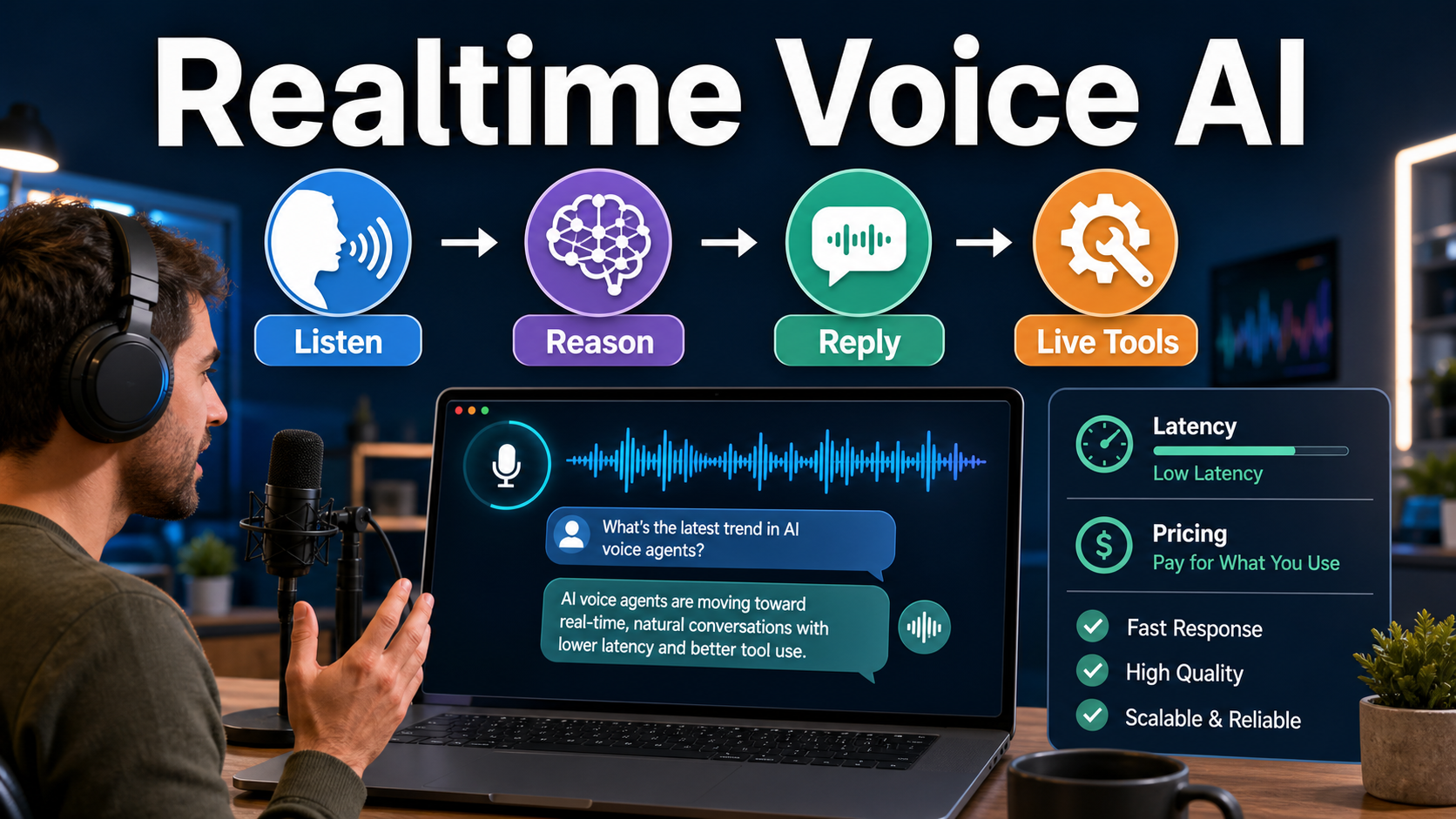
AI realtime voice models are best for experiences where speaking and listening must happen in the same flow: customer support, sales qualification, live coaching, language practice, accessibility, and voice-controlled tools. If your user can wait for a transcript, a normal speech-to-text plus text model plus text-to-speech pipeline is usually cheaper and easier to control.
Updated June 29, 2026: this guide checks current details against the official OpenAI Realtime API docs, OpenAI API pricing, Google Gemini Live API docs, and Gemini API pricing. Pricing and model names can change, so teams should verify the official page again before production launch.
What is AI realtime voice?
AI realtime voice is a live audio interaction where a model receives streaming speech, maintains conversation state, reasons over the request, optionally calls tools, and responds with spoken audio while the session remains open.
In a traditional voice AI workflow, the app records audio, sends it to a speech-to-text model, passes the transcript to an LLM, then sends the answer to a text-to-speech model. That can work well for voicemail analysis, meeting notes, podcast clipping, and asynchronous assistants. Realtime voice is different because it is designed for turn-taking, interruptions, partial audio, and low-latency spoken replies.
OpenAI’s current realtime documentation describes voice-agent sessions that connect to /v1/realtime, send audio or text, and listen for model responses, tool calls, and session events. Google describes the Gemini Live API as a preview API for low-latency real-time voice and vision interactions. In both cases, the model is part of a live conversation, not a batch job.
When should you use realtime voice?
Use realtime voice when the user’s spoken timing matters. If the product needs natural back-and-forth, interruption handling, or live tool actions, realtime voice can feel far better than a stitched pipeline.
| Use case | Why realtime helps | When to avoid it |
|---|---|---|
| Customer support voice agent | Users can explain issues naturally, interrupt, and get immediate answers. | A form or chatbot already solves the issue with lower cost. |
| Sales qualification | The assistant can ask follow-up questions and update CRM fields through tools. | Leads are low intent or only need a simple booking form. |
| Creator coaching | A user can practice scripts, pronunciation, or pitch delivery in a live loop. | The workflow is mostly editing, reviewing, or scoring after recording. |
| Language learning | Natural turn-taking and interruptions make practice feel closer to a tutor. | The lesson is grammar-heavy and does not require spoken dialogue. |
| Voice-controlled app tools | The model can listen, reason, and call functions while the user stays hands-free. | Misheard commands would create high-risk actions without review. |
When a normal audio pipeline is better
A standard audio pipeline is better when latency is not the main value. For many content and business workflows, transcription plus a regular LLM plus speech generation is more predictable and cheaper.
For example, a marketer turning webinar recordings into blog briefs does not need a live voice model. A podcaster generating show notes does not need barge-in handling. A developer analyzing support calls can process recordings after the fact. In those cases, realtime adds session complexity, audio routing, and usage monitoring without improving the final result.
Choose the simpler pipeline when you need:
- Meeting transcription and summaries.
- Podcast clips, chapters, and social captions.
- Batch analysis of sales or support calls.
- Script narration where the text is already approved.
OpenAI Realtime API: what is officially confirmed?
OpenAI’s official docs currently point developers to gpt-realtime-2 for low-latency voice agents, gpt-realtime-translate for live translation, and gpt-realtime-whisper for realtime transcription. The docs also distinguish connection methods: WebRTC for browser and mobile audio, WebSocket for server media pipelines, and SIP for telephony scenarios where supported.
OpenAI’s official pricing page, checked on June 29, 2026, lists realtime and audio generation pricing per 1 million tokens unless noted. It lists gpt-realtime-2 audio at $32 input, $0.40 cached input, and $64 output per 1M tokens; text at $4 input, $0.40 cached input, and $24 output; and image input at $5 input and $0.50 cached input. It also lists gpt-realtime-translate at $0.034 per minute and gpt-realtime-whisper at $0.017 per minute.
That does not mean every voice product should use the highest-quality realtime path for every interaction. Separate live conversations from background tasks, cache repeated context where supported, and keep tool calls narrow.
Google Gemini Live API: what is officially confirmed?
Google’s official Gemini Live API page says the Live API is in Preview and enables low-latency real-time voice and vision interactions with Gemini. It also lists capabilities such as multilingual support, barge-in, tool use, audio transcriptions, and proactive audio.
Google’s pricing page, checked on June 29, 2026, lists gemini-2.5-flash-native-audio-preview-12-2025 under Gemini 2.5 Flash Native Audio for the Live API. It states that preview models may change before becoming stable and have more restrictive rate limits. The paid tier shown on that official page is $0.50 per 1M text input tokens, $3.00 per 1M audio or video input tokens, $2.00 per 1M text output tokens including thinking tokens, and $12.00 per 1M audio output tokens.
Because this is officially labeled Preview, teams should avoid treating model names, rate limits, and production guarantees as permanent. Prototype with it, test your audio quality, and confirm terms before committing a high-volume customer workflow.
Practical workflows for creators and marketers
Creators and marketers do not need realtime voice for every AI audio task. The strongest workflows are the ones where live speaking changes the outcome.
1. Live script rehearsal
A creator can read a product pitch aloud, receive immediate coaching, and retry until the message is clearer. The assistant can listen for pacing, filler words, missing benefits, and weak calls to action.
2. Voice-based content intake
A marketing team can interview a founder, sales rep, or customer by voice, then convert the conversation into campaign angles, FAQ answers, landing page copy, or short video scripts.
3. Interactive product demos
A SaaS or AI tool directory can let visitors ask questions aloud while the assistant opens pages, filters categories, or explains differences between tools.
4. Localized voice practice
For teams selling in Vietnam and global markets, realtime voice can help staff practice English sales calls, customer support replies, or product explanations.
Developer checklist before building
Before choosing a realtime voice stack, define the interaction limits. The model should know what it can say, which tools it can call, and when it must hand off to a human.
- Latency target: decide what feels acceptable for your users, then test on real devices and networks.
- Connection method: use WebRTC for direct live audio and WebSocket for server media pipelines.
- Tool permissions: separate safe read actions from risky write actions.
- Fallback path: provide text chat, callback, or human handoff when audio fails.
- Cost guardrails: cap session length and track audio input and output usage separately.
Prompt tips for realtime voice agents
Realtime voice prompts should be shorter and more operational than blog-writing prompts. The model needs conversational behavior, clear tool rules, and recovery instructions.
You are a live voice assistant for an AI tools website.
Keep replies under 12 seconds unless the user asks for detail.
Ask one question at a time.
If the user asks for a tool recommendation, collect: goal, budget, skill level, and output format.
Use the search_tools function only after you have enough information.
Before any account or billing action, summarize the action and ask for confirmation.
If audio is unclear, ask the user to repeat the last sentence.
For support agents, add a strict escalation rule. For sales agents, add a qualification structure. The most common mistake is asking a live model to produce long monologues; realtime voice works better when replies are brief and turn-based.
Pros and cons of AI realtime voice
| Pros | Cons |
|---|---|
| More natural than text chat for many users. | More complex than transcription plus text generation. |
| Supports interruptions, turn-taking, and live coaching. | Audio input and output can increase cost quickly. |
| Can combine conversation with tool calls. | Requires careful safety boundaries for actions. |
| Useful for accessibility and hands-free workflows. | Needs testing across accents, noise, devices, and networks. |
Edit AI videos here
If you are using realtime voice to plan scripts, record narration, or test ad ideas, the next step is often editing the final clips. You can edit AI videos here: https://ai.alphatechnologies.vn. Use the voice assistant to refine the script, then turn the strongest take into a short product demo, social video, or training clip.
How to decide: realtime or not?
Choose realtime voice only when live conversation creates measurable value. Good signals include faster support resolution, better lead qualification, more completed onboarding, improved speaking practice, or a more accessible interface for users who prefer voice.
Do not choose it just because voice AI is trending. Start with one narrow workflow, measure session length and completion rate, and compare it against text chat or asynchronous audio processing.
For more practical AI workflows, model comparisons, and creator tools, explore Aikolhub and compare the AI tools that fit your budget, content format, and technical level.
FAQ
What is the main benefit of AI realtime voice?
The main benefit is natural live interaction. Users can speak, interrupt, clarify, and receive spoken replies without waiting for a full record-transcribe-generate-speak cycle.
Is realtime voice always cheaper than speech-to-text plus text-to-speech?
No. Realtime voice can cost more because it may process continuous audio input and audio output. For batch transcription, summaries, and content editing, a standard pipeline is often cheaper.
Can realtime voice models call tools?
Yes, current official docs from major providers describe tool use or function calling patterns for realtime voice experiences. Developers should still restrict tools carefully and require confirmation for risky actions.
Is Google Gemini Live API production-stable?
Google’s official page labels the Live API as Preview, and its pricing page says preview models may change before becoming stable. Treat that status as a reason to prototype carefully and verify current limits before launch.
What should creators use realtime voice for?
Creators should use realtime voice for live script rehearsal, interview-style idea capture, pronunciation practice, and interactive audience experiences. For editing finished audio or video, regular transcription and editing tools may be enough.
What is the safest first realtime voice project?
A low-risk assistant that answers questions, recommends tools, or coaches practice sessions is safer than one that changes accounts, makes purchases, or sends messages without review.