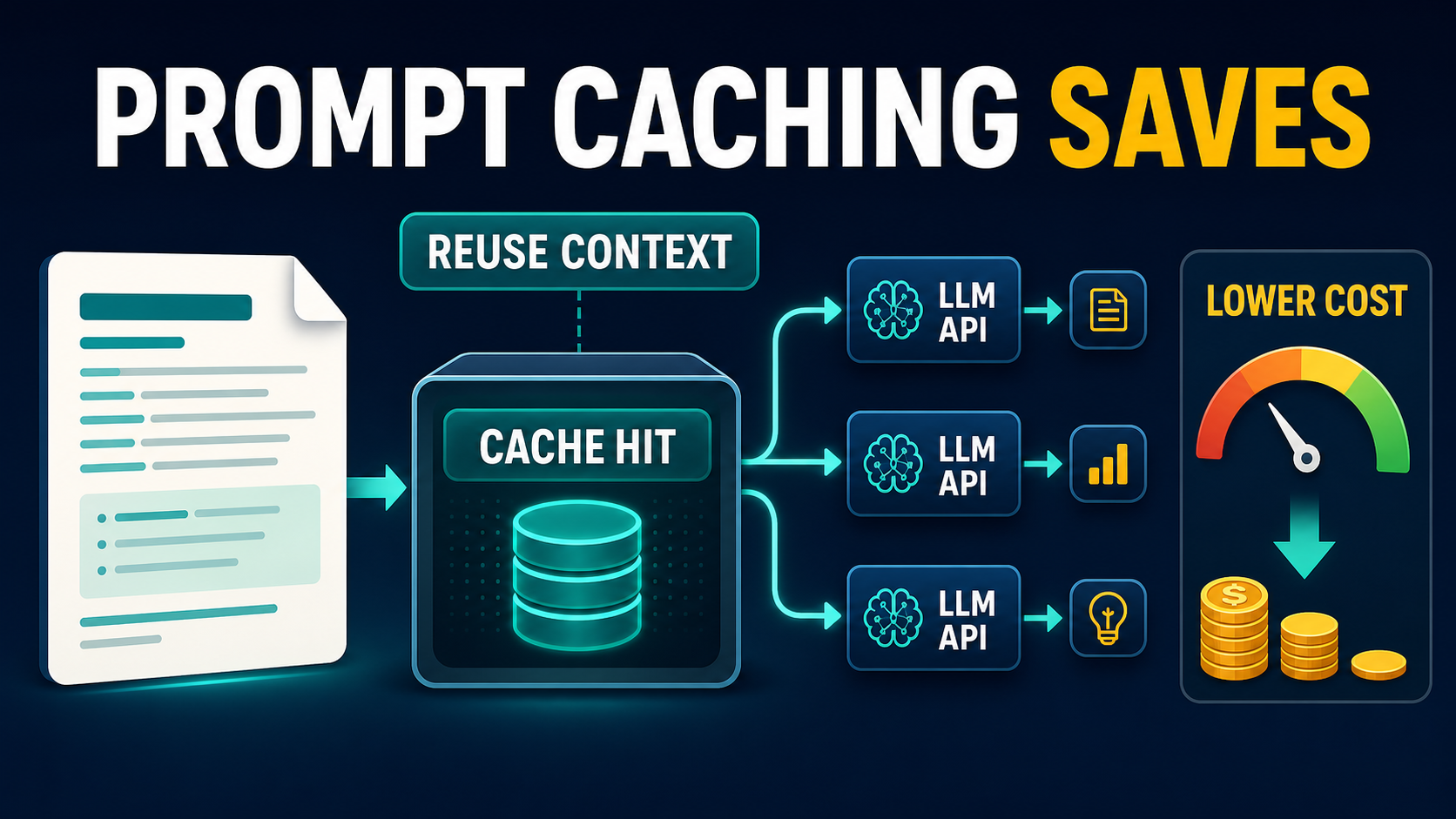
Prompt caching reduces LLM API costs by letting a provider reuse previously processed input when later requests begin with the same large block of text or media. It works best for long system instructions, reference documents, tool definitions, conversation history, or media that many requests share. As of July 13, 2026, OpenAI, Anthropic, and Google document caching features, but their activation rules, cache lifetimes, and billing models differ.
Caching is not a substitute for shorter prompts or retrieval-augmented generation (RAG). It is an additional optimization for context that genuinely must be sent repeatedly. The practical goal is to make the stable portion large and identical, put it first, and append changing user data afterward.
What is prompt caching?
Prompt caching stores or recognizes a reusable prefix so the model provider does not need to perform the same full input computation for every request. A cache hit is billed at a reduced input rate on supported models and can also improve time to first token. Outputs are still generated normally and billed separately.
Think of a support assistant with a 12,000-token policy manual. Without caching, every question sends and processes the manual again. With caching, the first request establishes or writes the reusable context; later requests can read that context at the provider’s cached-input rate while adding only the new customer question.
What can be cached?
- Long system prompts, policies, brand rules, and output schemas
- Stable tool definitions used by an agent
- A document, codebase snapshot, transcript, image, audio file, or video supported by the chosen API
- Earlier conversation turns that remain byte-for-byte or structurally unchanged
- Shared few-shot examples placed before variable user input
How major LLM APIs handle caching
The providers share the same basic idea but not the same implementation. Check the exact model page before deployment because support and prices can change. The comparison below uses official documentation checked on July 13, 2026 and focuses on durable mechanics rather than assuming every model has identical rates.
| Provider | How caching works | Official cost rule | What to monitor |
|---|---|---|---|
| OpenAI | Automatic prefix caching on supported models; repeated prefixes improve hit probability | Cached input has a model-specific discounted rate; discounts vary by model | cached_tokens in prompt token usage details |
| Anthropic | Automatic top-level caching or explicit cache breakpoints | 5-minute writes are 1.25x base input, 1-hour writes are 2x, and cache reads are 0.1x base input | cache_creation_input_tokens and cache_read_input_tokens |
| Google Gemini | Implicit caching for Gemini 2.5 and newer models in the Interactions API; explicit cached content is available through generateContent workflows | Cache-hit and storage pricing depend on the model and API mode | usage.total_cached_tokens or cached-content usage metadata |
OpenAI’s current pricing page should be treated as the source of truth for each model’s cached-input rate. Anthropic publishes explicit multipliers: a five-minute cache generally breaks even after one useful read, while a one-hour cache generally needs two reads. Google’s documentation says implicit caching is enabled by default for Gemini 2.5 and newer models and recommends placing large common content at the beginning.
When prompt caching saves money
Prompt caching pays when the reusable prefix is large enough, supported by the model, and read often enough before it expires. High request volume alone is not sufficient: the requests must actually share the same prefix.
Strong use cases
- Customer support: reuse product policies, response standards, and tool schemas across many tickets.
- Document chat: ask repeated questions about the same contract, report, or transcript.
- AI agents: retain stable instructions and large tool definitions while user tasks change.
- Code assistants: reuse repository guidance and a stable code snapshot during a focused session.
- Media analysis: query the same long audio or video asset several times when the API supports that modality.
- Campaign production: reuse a detailed brand brief while generating many ads, emails, and social variants.
Weak use cases
- Short prompts that do not meet a provider’s minimum caching threshold
- One-off requests with no second read
- Prompts whose timestamps, IDs, or dynamic data change near the beginning
- RAG pipelines where every retrieved chunk is different
- Workloads spaced farther apart than the cache lifetime
Calculate savings before implementation
Use a workload model rather than a headline discount. Separate reusable input, variable input, output, cache-write cost, cache-read cost, storage cost where applicable, and expected hit rate.
Monthly cost = cache writes + cache reads + uncached reusable input + variable input + output + storage
For a simple illustration, assume each request contains 20,000 reusable tokens, 1,000 variable tokens, and 500 output tokens. If 10,000 monthly requests achieve an 80% cache-hit rate, 160 million reusable input tokens become cache reads; 40 million still miss and receive standard input treatment. Apply the current rate for the exact model, then add variable input and all output. Do not calculate savings by discounting the entire request.
Cost-estimation checklist
- Export token usage from a representative production week.
- Measure the stable prefix separately from user-specific content.
- Estimate realistic cache hits by session length and request timing.
- Include write and storage charges, not only read discounts.
- Model misses caused by prompt changes or expiration.
- Compare the result with prompt trimming and RAG.
Design prompts for reliable cache hits
Cache-friendly prompts follow a stable-first structure. Put the largest reusable material first and move request-specific content to the end. Even a harmless dynamic value near the top can split traffic into many cache keys and erase savings.
SYSTEM RULES (stable)
BRAND AND SAFETY POLICY (stable)
TOOL DEFINITIONS (stable)
FEW-SHOT EXAMPLES (stable)
REFERENCE DOCUMENT (stable)

USER ID: {{dynamic}}
CURRENT QUESTION: {{dynamic}}
RESPONSE FORMAT: {{dynamic only if required}}
Workflow tips
- Version stable prompts: update a version only when instructions materially change.
- Normalize serialization: keep JSON key order, whitespace, tool order, and schemas consistent.
- Batch similar traffic: process requests sharing a prefix within the useful cache window when the product permits it.
- Do not add timestamps at the top: place volatile metadata after cached content.
- Track hits per prompt version: aggregate metrics can hide one poorly structured workflow.
- Protect privacy: follow the provider’s retention and data-control documentation; never assume a cache changes contractual privacy guarantees.
Prompt caching versus RAG
Prompt caching and RAG solve different problems. Caching lowers repeated processing cost for context you still send to the model. RAG searches an external index and sends only selected passages. Many production systems benefit from both.
| Need | Best starting point |
|---|---|
| Repeated questions about one fixed, moderately sized document | Prompt caching |
| Search across thousands of changing documents | RAG |
| Stable instructions plus changing retrieved evidence | Cache instructions; retrieve evidence with RAG |
| Exact source citations and access controls | RAG with metadata filters |
| Repeated analysis of a long video or transcript | Context caching if the selected API supports it |
A hybrid support assistant might cache its global policy and tool definitions, retrieve three relevant help-center passages per ticket, and append the customer’s message last. That preserves cache hits without paying to attach the full knowledge base.
Pros and cons
Pros
- Lower input cost for genuinely repeated context
- Potentially lower latency and faster first-token delivery
- Minimal product change when caching is automatic
- Useful alongside RAG, batching, and model routing
Cons
- Provider-specific rules make cross-platform estimates harder
- Writes, storage, expiry, and misses can reduce savings
- Small prompt changes can prevent hits
- Usage dashboards need separate cache metrics
- Caching does not fix unnecessary context or weak retrieval
Production rollout checklist
- Confirm caching support for the exact model and endpoint.
- Record the official prices and verification date in your cost model.
- Create a stable-prefix template and isolate dynamic fields.
- Test identical, near-identical, and expired-cache requests.
- Log input, output, cache-write, cache-read, and hit-rate metrics.
- Set an alert if hit rate or savings falls below target.
- Review privacy, residency, retention, and deletion requirements.
- Recalculate after every model, price, or prompt-version change.
Edit AI videos here
If your cached workflow helps produce video scripts, shot lists, captions, or campaign variations, assemble and refine the final clips at https://ai.alphatechnologies.vn. Keep the stable creative brief cached, then pass each new scene request into your production workflow.
Conclusion
Prompt caching is most valuable when a large, stable prefix serves several requests within the provider’s cache window. Start with one high-volume workflow, move dynamic values to the end, measure actual cache reads, and compare total cost rather than advertised discounts. For more practical model, API, and workflow guides, explore AI tools and resources on Aikolhub.
Frequently asked questions
Does prompt caching change the model’s answer quality?
No. A cache hit reuses processed input; it does not reuse the previous answer. Output can still vary according to the model and generation settings.
Is prompt caching automatic?
It depends on the provider and API. OpenAI supports automatic prefix caching on eligible models. Gemini’s Interactions API uses implicit caching for Gemini 2.5 and newer models. Anthropic supports automatic caching and explicit breakpoints.
How much can prompt caching save?
Savings depend on the model, reusable-token share, write and storage charges, hit rate, and output volume. Calculate with official current rates for the exact endpoint.
Why is my cache-hit rate low?
Common causes are changing text near the beginning, inconsistent serialization, prompts below the minimum size, requests outside the cache lifetime, or unsupported models.
Should I use prompt caching or RAG?
Use caching for repeated stable context and RAG for selecting small relevant passages from a large or changing collection. Combine them when both needs exist.
Can cached prompts contain private data?
Only if your provider agreement, retention settings, regional controls, and security review permit it. Treat caching as a processing feature, not an automatic privacy guarantee.