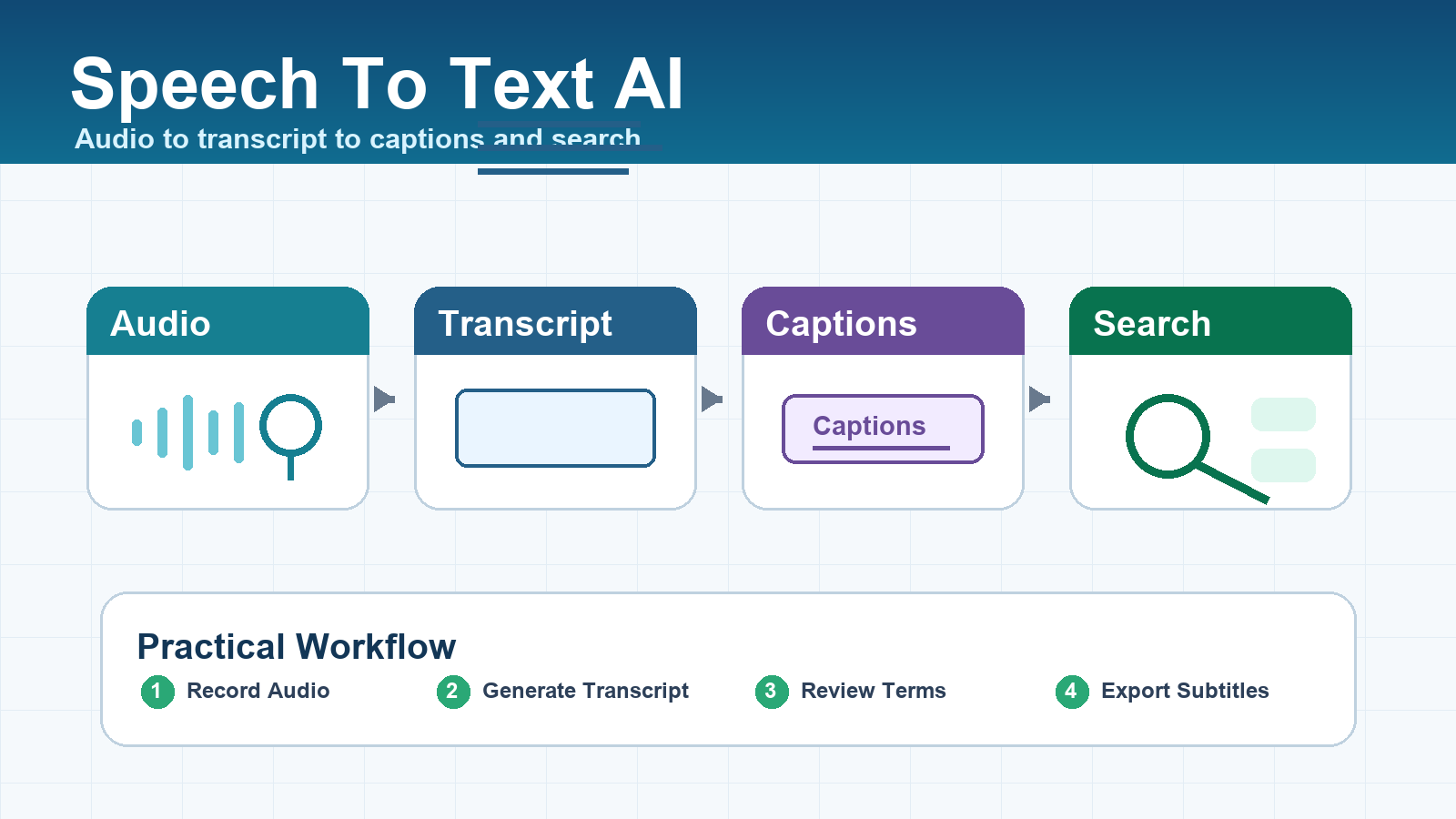
Speech to text AI converts audio into searchable, editable text for meeting notes, subtitles, podcasts, customer calls, and video workflows. The best model depends on your audio quality, language mix, latency needs, speaker diarization, privacy requirements, and budget. This guide was checked against official sources on July 8, 2026.
For creators, marketers, developers, and AI tool users, transcription is no longer just a convenience feature. It is the layer that makes audio and video reusable: captions improve accessibility, transcripts support SEO, searchable notes help teams find decisions, and structured text can feed summaries, clips, support workflows, and training content.
Quick answer: which speech to text AI should you choose?
Choose a file-based transcription model when you upload recordings after a meeting or video shoot. Choose a realtime transcription model when captions or live notes must appear while someone is speaking. Choose a specialist speech API when you need diarization, redaction, keyterm boosting, high concurrency, or enterprise controls.
| Use case | Best first choice | Why it fits |
|---|---|---|
| Meeting recordings | File transcription with diarization | You need speaker labels, timestamps, and clean notes more than instant output. |
| Video subtitles | File transcription with SRT or VTT export | Subtitle formats and timing accuracy matter most. |
| Live captions | Realtime streaming transcription | Low latency matters more than perfect final punctuation. |
| Podcast repurposing | Batch transcription plus summarization | One transcript can become clips, articles, quotes, and show notes. |
| Voice agents | Realtime STT plus LLM plus TTS | The app must listen, reason, and respond in one flow. |
What changed in speech to text AI?
The practical change is that speech recognition has become part of a larger content and automation stack. OpenAI’s official audio guide describes speech to text as useful for captions, notes, transcripts, analytics, search, and accessibility, with both request-based and streaming paths. That split is important: not every transcription task needs realtime audio.
OpenAI’s current speech to text documentation lists request-based transcription models including whisper-1, gpt-4o-transcribe, gpt-4o-mini-transcribe, and a diarization-capable gpt-4o-transcribe-diarize. Its realtime transcription guide positions gpt-realtime-whisper as a live transcription option, while warning that teams should test it against their own audio, languages, vocabulary, and latency requirements before switching production traffic.
Key criteria before choosing a transcription model
The best speech to text model is the one that performs well on your real recordings, not the one with the most impressive demo. Test with noisy calls, overlapping speakers, Vietnamese and English names, product terms, filler words, weak microphones, and long recordings.
1. Accuracy on your real audio
Accuracy depends on microphone quality, background noise, accents, language switching, speaker overlap, vocabulary, and compression. A model that performs well on studio audio may struggle with a busy office, a phone call, or a livestream. Build a small test set of 20 to 50 files before committing.
2. Batch or realtime latency
Batch transcription is usually better for finished assets: webinars, podcasts, interviews, courses, meeting recordings, and YouTube subtitles. Realtime transcription is better for live captions, voice agents, call monitoring, and interactive note taking. Lower latency can mean more partial or unstable text, so test both speed and final transcript quality.
3. Speaker diarization
Diarization identifies who spoke when. It is essential for meetings, interviews, sales calls, user research, and podcasts with multiple speakers. If your workflow needs action items by person, quote attribution, or call coaching, choose a provider or model path that officially supports speaker labels.
4. Subtitle exports
For video, do not stop at plain text. Check whether the workflow exports SRT, VTT, or timestamped JSON. OpenAI’s documentation says whisper-1 supports output formats including SRT and VTT, while newer transcription models have different supported output formats. That matters if your publishing pipeline expects subtitle files.
5. Language and vocabulary support
Vietnamese creators and global teams often need mixed-language transcription. Test proper names, product names, acronyms, local place names, English technical terms, and speaker switching. If a provider supports language hints or keyterm prompting, use them carefully and measure whether they improve results.
Pricing snapshot checked July 8, 2026
Pricing changes frequently, so treat this as a verified snapshot rather than a permanent recommendation. Check the official pricing page again before deploying a production workflow or quoting client budgets.
| Provider | Official price signal checked | Best fit |
|---|---|---|
| OpenAI | gpt-4o-transcribe estimated at $0.006/minute; gpt-4o-mini-transcribe estimated at $0.003/minute; gpt-realtime-whisper listed at $0.017/minute. |
Developers already using OpenAI for content, captions, and AI workflows. |
| Google Cloud Speech-to-Text | Speech-to-Text v2 standard recognition listed at $0.016/minute for the first 500,000 monthly minutes; dynamic batch standard listed at $0.003/minute. | Google Cloud teams, high-volume batch jobs, and enterprise pipelines. |
| AssemblyAI | Pricing page lists Universal model tiers and a free tier; the page states free access can include up to 185 hours of pre-recorded transcription and 333 hours of streaming transcription. | Teams that want transcription plus audio intelligence features. |
| Deepgram | Pricing page lists speech-to-text rates by model and mode, including multilingual Nova pricing and add-ons such as redaction and keyterm prompting. | Realtime apps, voice products, and teams needing speech-specific controls. |
| Open-source Whisper | OpenAI’s GitHub repository describes Whisper as a general-purpose speech recognition model under an MIT license. | Local experiments, private prototypes, and teams that can manage inference. |
Workflow for meetings
A meeting transcription workflow should produce decisions, action items, and searchable notes, not just a wall of text. The transcript is the raw material; the finished asset is a structured record your team can trust.
- Record clean audio: use separate microphones when possible, reduce background noise, and avoid recording from laptop speakers across a room.
- Transcribe with timestamps: keep timestamps so reviewers can jump back to the original audio.
- Add speaker labels: use diarization or a manual review pass for important meetings.
- Summarize from the transcript: ask an LLM for decisions, risks, deadlines, owners, and unresolved questions.
- Store source and summary together: keep the audio, transcript, summary, and meeting date linked in your workspace.
Prompt tip for meeting summaries
Turn this transcript into meeting notes.
Return: summary, decisions, action items with owners, deadlines, blockers, and open questions.
If a speaker or deadline is unclear, write 'not confirmed' instead of guessing.
Keep quotes only when they are important and include timestamps.
Workflow for video captions and subtitles
For video, transcription quality affects watch time, accessibility, SEO, and repurposing. A good caption workflow includes timing, line length, review, and export formatting.
- Generate a timestamped transcript from the final audio track.
- Export SRT or VTT when your platform supports it.
- Keep captions short enough to read on mobile.
- Review names, numbers, prices, URLs, and product claims manually.
- Create a clean transcript page for long-form SEO when appropriate.
Marketers should also use transcripts to find clips. Search for strong claims, objections, customer questions, comparisons, and quotable moments, then turn those into short social videos or landing page sections.
Pros and cons of speech to text AI
| Pros | Cons |
|---|---|
| Makes audio and video searchable | Names, jargon, and numbers still need review |
| Improves accessibility with captions | Noisy audio can reduce accuracy sharply |
| Turns meetings into structured notes | Diarization can fail with overlapping speakers |
| Feeds SEO articles, clips, and summaries | Realtime captions may show unstable partial text |
| Can automate high-volume workflows | Privacy and retention policies must be checked |
Checklist before production
Use this checklist before putting speech to text AI into a client workflow, internal knowledge base, or public content pipeline.
- Test at least 20 real audio samples from your target users.
- Measure word error rate on names, numbers, and domain terms.
- Confirm supported languages, output formats, and diarization features.
- Check pricing for batch, realtime, add-ons, and minimum billing units.
- Review data retention, privacy, and regional processing requirements.
- Add human review for subtitles, legal claims, medical content, pricing, and sales promises.
- Log model name, provider, date, language, duration, and transcript version.
Edit AI videos here
After transcription, many creators want to turn the transcript into clips, subtitles, and social edits. You can edit AI videos here: https://ai.alphatechnologies.vn. A practical workflow is to transcribe the source video, extract the best moments, create captions, and export platform-ready versions for TikTok, YouTube Shorts, Reels, ads, or training content.
Final recommendation
Start with the workflow, then choose the model. For uploaded meetings and videos, use batch transcription with timestamps, subtitle export, and review. For live captions or voice agents, use a realtime model and measure latency with real users. For enterprise or high-volume speech products, compare specialist APIs on diarization, redaction, keyterm support, concurrency, and support terms.
Explore more AI audio, video, and productivity tools on Aikolhub to build a content workflow that turns conversations into captions, summaries, searchable knowledge, and reusable marketing assets.
FAQ
What is speech to text AI?
Speech to text AI is software that converts spoken audio into written text. It is used for meeting notes, subtitles, captions, call analytics, search, accessibility, and content repurposing.
Is realtime transcription always better?
No. Realtime transcription is best when text must appear while someone is speaking. Batch transcription is often better for finished recordings because you can optimize quality, timing, review, and formatting.
Do I need speaker diarization?
You need diarization when multiple people speak and attribution matters, such as meetings, interviews, podcasts, research calls, and sales conversations.
Can speech to text AI handle Vietnamese and English?
Many modern systems support multiple languages, but mixed-language accuracy must be tested. Use real samples with Vietnamese names, English terms, accents, and noisy audio before production.
Can I use open-source Whisper locally?
Yes. OpenAI’s Whisper repository describes it as a general-purpose speech recognition model under an MIT license. Local use still requires suitable hardware, deployment work, and quality testing.
Should I review AI-generated captions manually?
Yes. Always review captions before publishing, especially names, numbers, prices, medical or legal statements, brand terms, and calls to action.