Insert shots make a story-critical detail readable, while cutaways briefly leave the main action to show a related subject, reaction, place, or consequence. For AI video, generate each as its own short, continuity-matched clip: decide its editorial purpose, build a dedicated reference frame, prompt one clear action, and cut it into an approved master scene.
This guide was verified on July 31, 2026. Camera-control systems can condition trajectories, orientation, intrinsics, lens distortion, or object motion, but they do not automatically decide where an insert belongs or preserve a prop across independently generated clips. Story logic and continuity still require a planned workflow.
Table of Contents
Visual meaning of inserts and cutaways
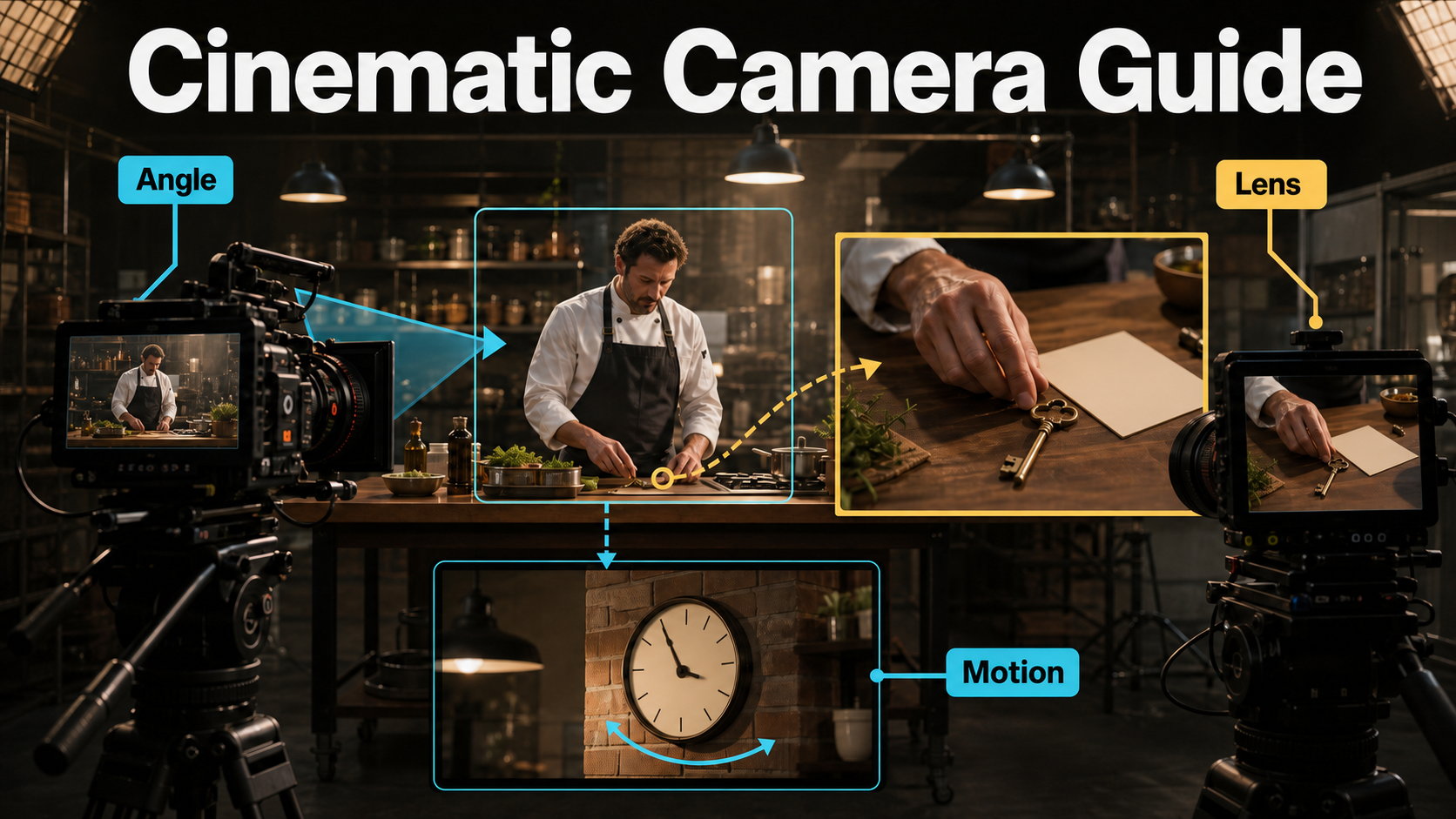
An insert shot isolates a detail already connected to the main scene: a finger pressing a switch, a key entering a lock, a phone notification, a signature, or ingredients changing texture. It answers a precise question the wider framing cannot answer clearly.
A cutaway shifts attention away from the current action. It may show a clock, an observer, rain outside, an empty chair, a machine reacting, or the destination a character mentions. It supplies context, emotion, evidence, or a clean bridge between two pieces of the main action.
Insert shot versus cutaway
- Insert: magnifies an object or action within the scene’s immediate story space.
- Cutaway: shows related information outside the current primary action.
- Reaction shot: is a cutaway when the edit leaves the active speaker or action to show a response.
- Detail montage: combines several inserts, but every detail should still advance information or rhythm.
When each shot earns the cut
Use an insert when viewers must identify, verify, or anticipate something. Use a cutaway when they need context, a reaction, a time cue, a location cue, or relief from a difficult edit. Avoid decorative coverage that repeats what the master already communicates; it spends time without adding meaning.
Plan continuity before generation
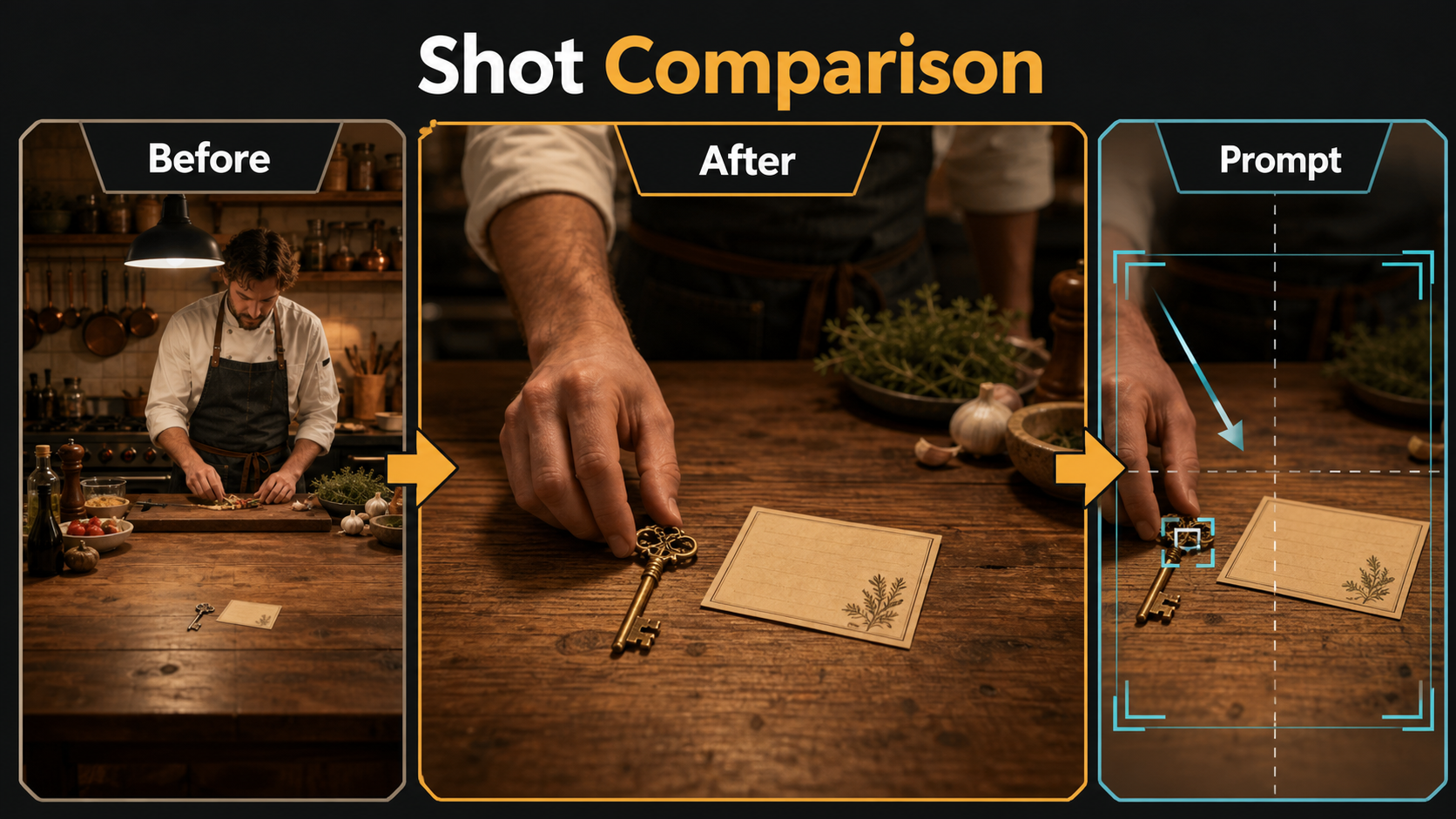
Choose the edit point before rendering. Note the exact state immediately before the cut and after it: which hand holds the key, where the card lies, whether the sleeve is rolled, how far the hand has moved, and which light creates the highlight. The insert must continue that state rather than invent a better-looking alternative.
Build a shot-purpose card
| Field | Decision |
|---|---|
| Purpose | What new fact or feeling does the shot deliver? |
| In point | Which exact motion or gaze motivates the cut? |
| Visible subject | One prop, action, reaction, or environmental cue |
| Continuity anchors | Hand, wardrobe, prop state, surface, light direction |
| Out point | What completed beat returns viewers to the main action? |
| Audio bridge | Dialogue, room tone, effect, or music continuing across the cut |
Camera placement and screen direction
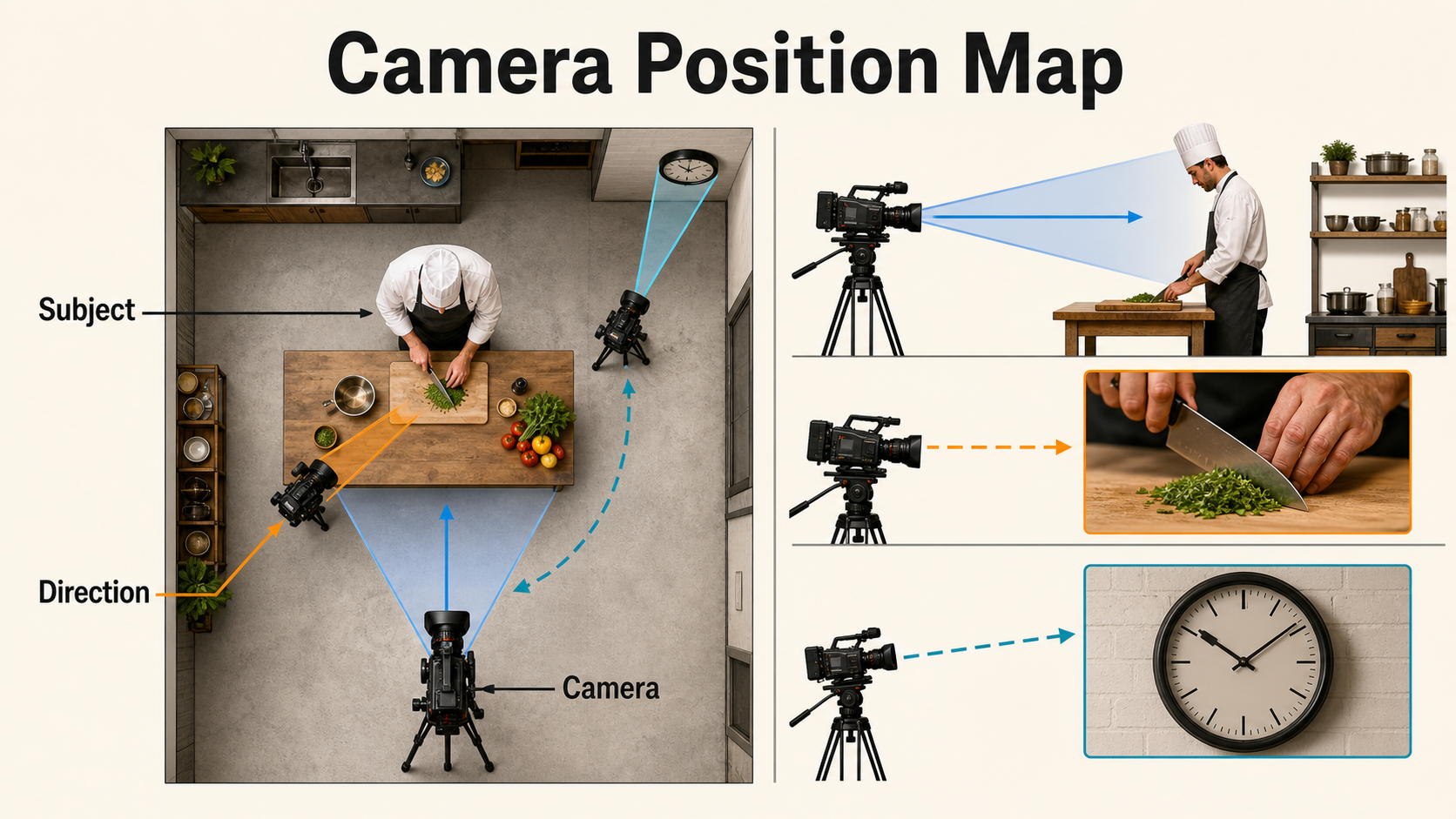
Place an insert camera where the detail can be read without contradicting the master. A hand moving screen-right in the wide shot should not suddenly move screen-left unless the edit intentionally changes viewpoint and gives viewers a strong orientation cue. Match the action axis, surface orientation, and light source.
Protect eyelines, light, and action
- Motivate the insert from a look, reach, sound, or line of dialogue.
- Keep the prop on the same side of the performer and surface.
- Match the active hand, sleeve, jewelry, dirt, and object orientation.
- Anchor light to a practical source such as a window or lamp.
- Preserve the action direction and leave edit handles before and after contact.
- For a cutaway, maintain a plausible relationship to the established room, time, and soundscape.
Lens, aperture, shutter, and duration
Inserts need clarity, not maximum blur. A longer or macro-like lens look can isolate a prop without moving the camera unnaturally close, while moderate depth of field keeps both the action point and essential context readable. Cutaways can be wider when their job is to re-establish place.
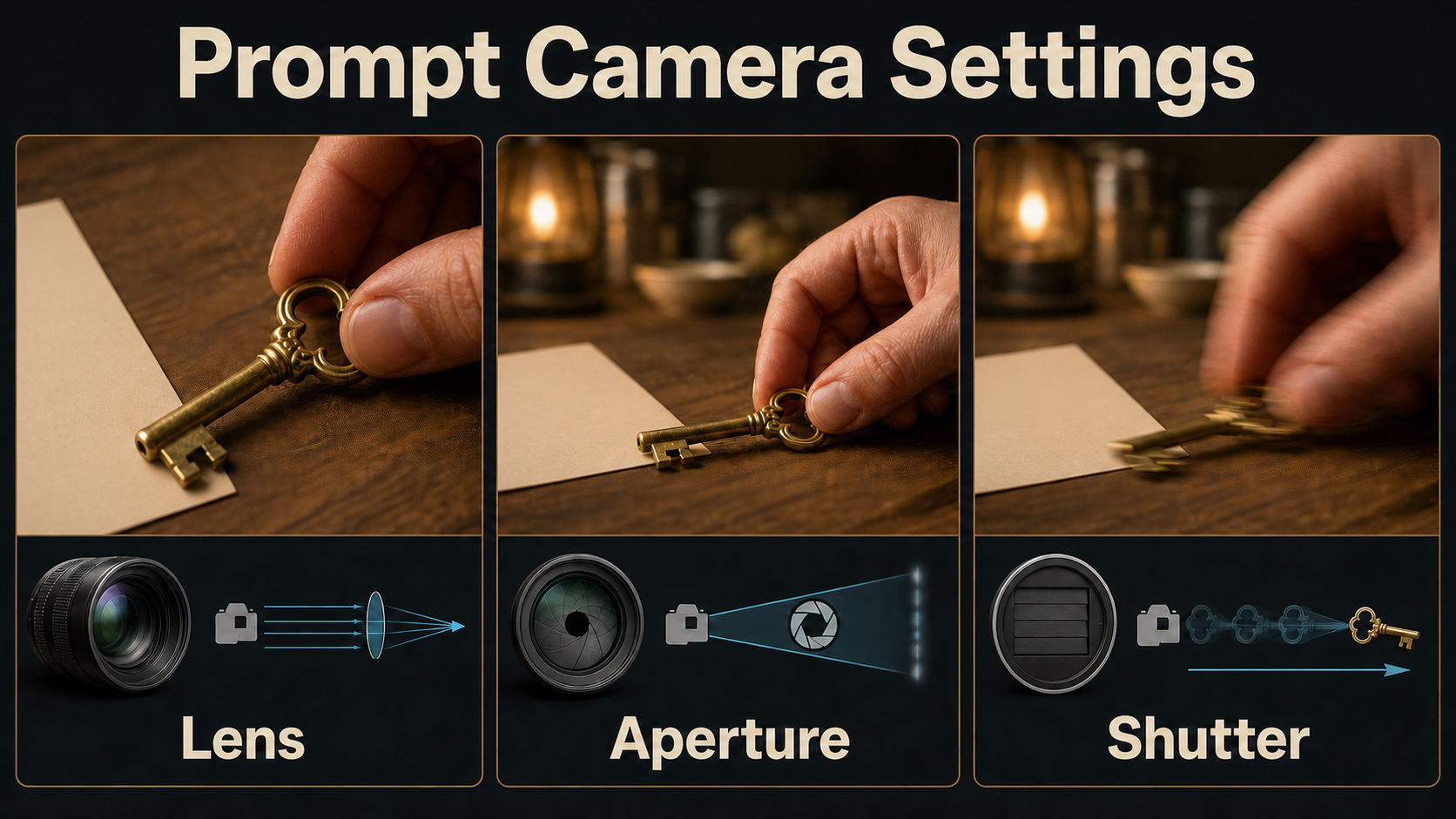
Practical starting settings
| Coverage | Lens look | Focus look | Movement | Typical screen time |
|---|---|---|---|---|
| Hand or prop insert | 70-100 mm or macro-like | f/4-f/8 equivalent; action point sharp | Locked or very slow push | 1-3 seconds |
| Phone or printed detail | 50-85 mm | Enough depth to keep critical information legible | Locked | Long enough to read |
| Reaction cutaway | 50-85 mm portrait look | Eyes sharp, soft background | Locked or restrained drift | 1-4 seconds |
| Environmental cutaway | 24-50 mm | Moderate or deep focus | Static, pan, or gentle push | 2-5 seconds |
At 24 fps, a 180-degree-shutter look is a practical starting description for natural motion blur. These numbers are visual targets, not guarantees that a generative model simulates calibrated optics. Match the rendered perspective, sharpness, and blur to adjacent shots by eye.
Reference image setup
Prepare a master still, an insert reference, and each cutaway reference before generating motion. Derive them from the same scene bible. The insert reference should already contain the final crop, correct hand, prop state, wardrobe edge, surface texture, and light direction. Do not ask the motion model to redesign the shot while animating it.
Reference pack checklist
- Identity, hand anatomy, wardrobe, accessories, and skin tone match the master.
- The prop has the same shape, color, orientation, damage, and state.
- The background surface and nearby objects remain stable.
- The camera side and action direction agree with the master.
- Highlight and shadow directions come from the same motivated source.
- The crop contains only details required for the editorial purpose.
- The cutaway belongs to the same time, weather, location, and color world.
Insert-shot and cutaway prompt formula
Write each prompt as shot purpose + exact subject + one action + framing + camera side + lens look + focus target + light + duration + continuity constraints + exclusions. One action per clip is easier to control and easier to edit.
Copyable insert-shot template
Story-critical insert of [exact object and hand] as [one action happens]. Tight [top/side/three-quarter] detail from the same side as the master, [lens] look, [focus] depth, [light source] from [direction], locked camera, natural motion blur, [duration]. Preserve the same hand, sleeve, surface, prop design, prop orientation, color, and action direction. No extra fingers, no new objects, no text changes, no camera orbit, no cut.Copyable cutaway template
Motivated cutaway to [related subject] revealing [new information or emotion]. [Shot size and angle], [lens] look, focus on [target], same time of day and lighting world as the master, [one restrained motion], [duration]. Preserve location logic, palette, weather, and screen direction. No unrelated people, no scene redesign, no embedded edit, no title text.Model workflow and camera control
Start with locked coverage. Add camera motion only after the master, insert, and cutaway match as still frames and short proofs. Record the model version, seed when exposed, duration, aspect ratio, guidance, motion strength, reference strength, and any trajectory file so a successful look can be reproduced.
What official projects control
- CamI2V documents image-to-video generation conditioned by camera trajectories, including rotation, translation, and zoom examples; its repository also links the RealCam-I2V work.
- RealCam-I2V provides exploratory CogVideoX 1.5 inference code and checkpoints for interactive complex camera control, while directing full paper reproduction to the DynamiCrafter implementation.
- UCPE documents control over camera motion, intrinsics, lens distortion, pitch, and roll through relative-ray and absolute-orientation encodings.
- CameraCtrl accepts camera-trajectory files and supplies trajectory visualization for camera position and orientation.
- MotionCtrl exposes camera-motion, object-motion, and combined conditioning modes.
These are control mechanisms, not editing semantics. A model may follow a push-in while changing the key, hand, or sleeve. Review camera compliance and continuity as separate tests.
Production steps
- Approve the master. Lock geography, performance, props, lighting, and the action axis.
- Mark editorial needs. List only details and cutaways that add information.
- Create reference stills. Match every continuity anchor before motion.
- Write one-beat prompts. State the precise subject, action, and exclusions.
- Generate locked proofs. Compare first, middle, and last frames with the master.
- Fix continuity first. Regenerate identity, hand, prop, or light errors before adding motion.
- Add restrained control. Apply a slow push or planned trajectory only when it improves the purpose.
- Build the edit. Use audio bridges, trim unstable handles, and cut on gaze, contact, or sound.
- Review in sequence. A shot that looks attractive alone can still fail at the cut.
Limitations and common failures
Close details expose weaknesses that wide shots hide: hands mutate, object geometry changes, printed information warps, reflections jump, and shallow focus misses the action. Cutaways may also invent a different room, season, or time of day. Short duration and strict references help, but do not remove the need for selection and repair.
Troubleshooting table
| Failure | Likely cause | Fix |
|---|---|---|
| Prop changes design | Weak or distant reference | Use a tight approved prop reference and repeat immutable traits |
| Wrong hand or sleeve | Continuity anchor omitted | Name the hand, sleeve, accessory, and movement direction |
| Action reverses | Camera side changed | Match the master axis and state screen direction explicitly |
| Detail is unreadable | Frame is too wide or focus too shallow | Tighten the reference and keep the full action point sharp |
| Extra fingers appear | Complex contact or long motion | Reduce the action, shorten duration, and hide unnecessary fingers |
| Cutaway feels random | No editorial motivation | Connect it to a gaze, sound, line, reaction, or story fact |
| Room or light changes | Independent scene invention | Reuse the scene bible and anchor practical lights by location |
| Camera move distracts | Motion stronger than the story beat | Return to a locked shot or a very slow push |
Approval checklist
- The shot introduces information, emotion, or a useful edit bridge.
- The hand, wardrobe, prop, surface, and light match the master.
- Action and gaze direction remain understandable across the cut.
- The critical subject is sharp and readable for the required time.
- No fingers, lettering, reflections, or object edges morph.
- Camera motion supports rather than competes with the detail.
- Audio continues naturally under the cut.
- The return to the master preserves action timing and prop state.
Edit AI videos here
Assemble and refine the approved clips at https://ai.alphatechnologies.vn. Place inserts on motivated contact points, use cutaways to carry dialogue or room tone, trim unstable generation handles, match exposure and color, repair audio transitions, add captions, and verify that every detail remains readable after vertical reframing.
Final recommendation
Treat inserts and cutaways as designed coverage, not emergency crops. Define the editorial purpose, derive a continuity-accurate reference, prompt one short action, approve a locked take, and add motion only when it clarifies the beat.
Explore Aikolhub for more practical AI video camera workflows, and reuse the shot-purpose card, prompt formula, and approval checklist whenever a generated scene needs clearer storytelling and cleaner edits.
Frequently asked questions
What is an insert shot?
An insert is a close detail of an object or action connected to the main scene, such as a hand turning a key. It makes story information readable that would be too small in the master shot.
What is a cutaway?
A cutaway temporarily leaves the primary action to show related context, a reaction, a location, or a consequence. It should add information or create a motivated edit bridge.
Should inserts be generated separately?
Yes. A dedicated reference and short prompt give better control over framing, hands, props, focus, and duration than cropping a wide generation or asking one clip to create multiple edits.
How long should an insert or cutaway last?
Keep it only as long as viewers need to understand the beat. Simple inserts often need one to three seconds; readable information or emotional reactions may require longer.
Can a cutaway hide AI video errors?
It can bridge two usable sections or cover a timing repair, but it should still be motivated. A random cutaway may conceal one glitch while creating a new continuity or story problem.