


The safest Phantom-Wan local setup starts with the 1.3B checkpoint, one or two clean reference images, and a short 832×480 test. Do not buy hardware or promise a VRAM target from a guessed table: the official Phantom repository documents single-GPU commands but does not publish a minimum-VRAM specification. Prove that the complete model stack loads, generates frames, and writes a playable file on your machine before attempting 14B, 720p, or longer sequences.
This guide is a first-run decision system, not another production-settings list. It verifies the released weights and license, maps the hidden storage and memory dependencies, and uses a green-screen presenter experiment to reveal identity drift, wardrobe leakage, and scene contamination early.
Table of Contents

Check what is actually released
Phantom is a subject-to-video framework from ByteDance’s Intelligent Creation Team. It balances text instructions with one or more reference subjects instead of treating the supplied image as a mandatory first frame. The public implementation adapts the method to Wan2.1 and exposes Phantom-Wan-1.3B and Phantom-Wan-14B checkpoints. As verified on September 21, 2026, the repository’s latest news still identifies the 14B release from May 27, 2025. The planned 14B Pro checkpoint and training code remain unchecked on the public todo list.
That status matters. Phantom-Wan is useful for placing a known person, product, animal, garment, or stylized character into a new scene. It is not a current Wan2.2 pipeline, a LoRA trainer, a video editor, or an audio generator. The official commands rely on the Wan2.1 1.3B model directory for the VAE and text encoder even when the Phantom checkpoint is 14B.
Code, weights, and license
The repository includes an Apache License 2.0 file and publishes inference source, so the code is open source under that license. The downloadable model parameters make Phantom-Wan an open-weight release. Keep these claims separate: an open-source code license does not automatically describe every upstream dependency, input asset, or model weight. Review the Wan2.1 model terms and the Hugging Face files before commercial deployment, and secure consent for identifiable reference subjects.
Choose the checkpoint
Start from the task, not the parameter count. For installation proof and prompt debugging, 1.3B reduces the cost of discovering a broken environment. Move to 14B only after you have a valid reference pack, a tested prompt, sufficient storage, and evidence that your compute path can load the larger shards.
Checkpoint comparison matrix
| Decision | Phantom-Wan-1.3B | Phantom-Wan-14B |
|---|---|---|
| Best first use | Install verification and rapid subject tests | Quality comparison after a passing baseline |
| Released artifact | Single Phantom-Wan-1.3B checkpoint | Sharded 14B checkpoint directory |
| Shared dependency | Wan2.1-T2V-1.3B VAE and text encoder | Same documented Wan2.1 1.3B dependency |
| Official example | 832×480, single GPU or eight-process FSDP example | 832×480, 121 frames, 24 fps; single GPU or eight-process FSDP example |
| References | One to four documented | Official examples use two or three; test ambiguity as count rises |
| Resolution caution | Repository lists 480p and 720p support | Trained on 480p; official notes say 720p and higher may be less stable |
| Choose when | You need a dependable first diagnostic | The 1.3B workflow passes and added quality justifies cost |

Selection decision tree
- Can you download the Wan2.1 1.3B dependency plus Phantom weights with comfortable free disk space? If no, stop and clear storage; partial downloads create misleading loader errors.
- Does your Python/CUDA environment run compatible PyTorch? If unknown, build a clean environment and verify CUDA before downloading both checkpoints.
- Is this your first Phantom-Wan render? If yes, choose 1.3B at 832×480. If no, continue.
- Did the same references and prompt pass identity and continuity review? If no, fix inputs before scaling. A larger model cannot rescue an ambiguous reference pack reliably.
- Can 14B load without allocation failure, system thrashing, or an offload configuration the official script does not document? If no, stay on 1.3B or use a separately documented community workflow. If yes, compare output quality with the same seed and inputs.
Install and download
Use Linux or a Linux-like CUDA environment unless you have independently validated another path; the official quickstart supplies shell commands but no Windows support matrix. Create an isolated Python environment, clone the official repository, and install its pinned requirements. The current file requires PyTorch 2.4 or newer, torchvision 0.19 or newer, Diffusers 0.31 or newer, Transformers 4.49 or newer, FlashAttention, xFuser, and NumPy below 2.
git clone https://github.com/Phantom-video/Phantom.git; cd Phantom; python -m venv .venv; source .venv/bin/activate; python -m pip install --upgrade pip; pip install -r requirements.txt; pip install "huggingface_hub[cli]"; huggingface-cli download Wan-AI/Wan2.1-T2V-1.3B --local-dir ./Wan2.1-T2V-1.3B; huggingface-cli download bytedance-research/Phantom --local-dir ./Phantom-Wan-ModelsDownloading the entire Phantom repository obtains both checkpoint families, which may be unnecessary for a first run. Inspect the official model files and fetch only the checkpoint you intend to test when storage or bandwidth is constrained. Preserve directory names used by the command or update paths explicitly.
Preflight checks
- Run
nvidia-smiand record GPU model, free memory, driver, and active processes. - Confirm Python imports
torch, reports CUDA available, and sees the expected device. - Verify checkpoint downloads completed; do not diagnose generation from a truncated shard.
- Keep output, cache, and model directories on a volume with working space beyond file sizes.
- Begin with the repository example shape rather than 720p, portrait, or a long frame count.
Run the first experiment
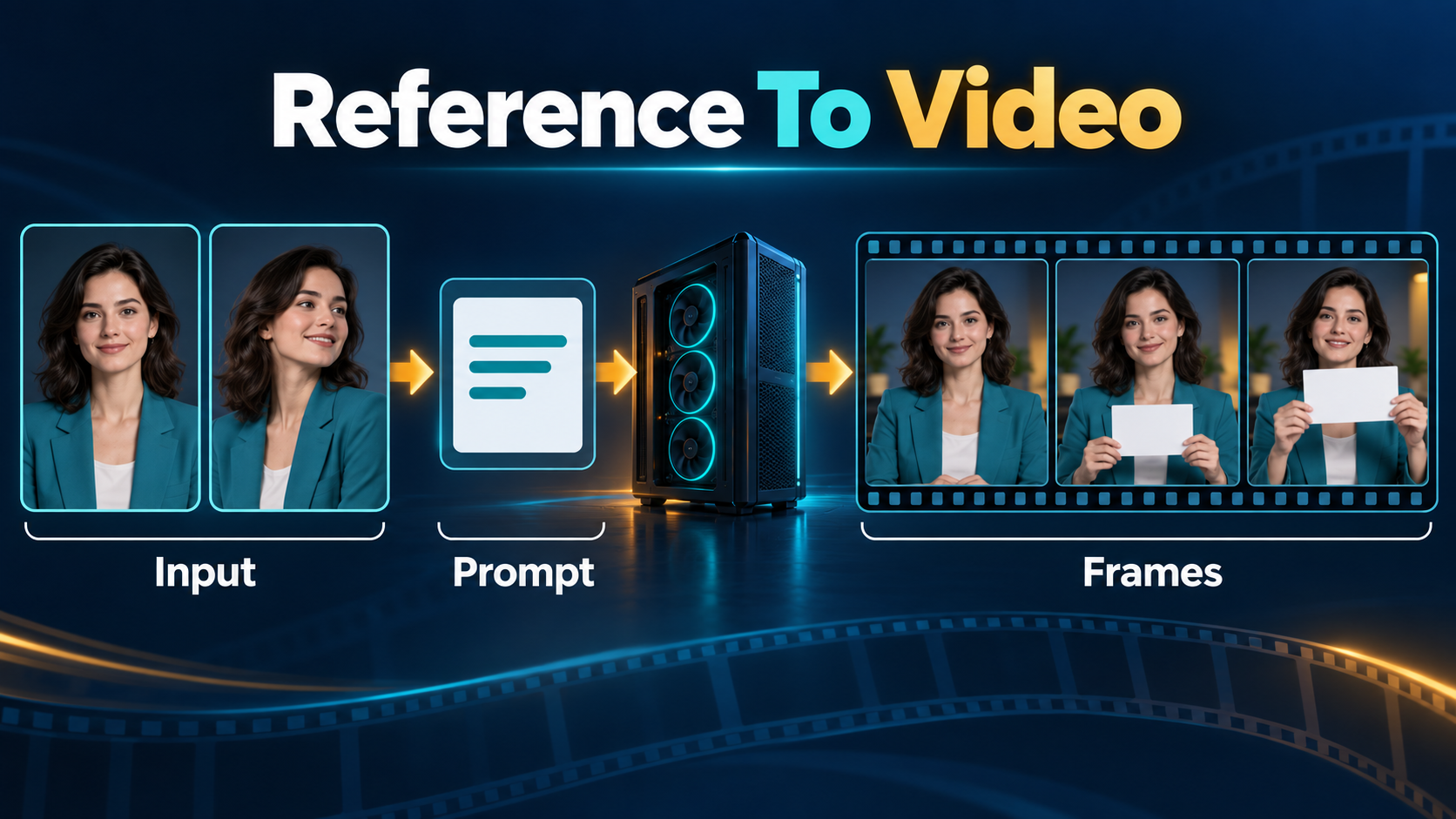
Use a controlled presenter shot: one consenting adult in a teal jacket against a plain green studio background, turning slightly and lifting a blank cue card. This case makes the reference contract visible. Face shape and hairstyle test subject identity; jacket color tests wardrobe; green tests background leakage; the cue card tests object integrity; the turn tests temporal consistency.
Prepare references and prompt
Choose two images of the same subject with compatible styling: one frontal head-and-shoulders view and one three-quarter view. Crop away unrelated people, readable brands, and busy backgrounds. Phantom supports up to four references, but more inputs are not automatically better; conflicting age, clothing, lighting, or viewpoint cues can confuse which attributes should persist.
The official guidance recommends describing visible reference details accurately. Use a prompt that names invariant attributes and desired changes:
An adult presenter with short dark curls and a teal canvas jacket stands in a clean green-screen studio. The presenter turns gently from front view to three-quarter view and raises a blank white cue card. Preserve facial proportions, hairstyle, jacket color, and card shape. Locked camera, soft even light, no extra people, no text, no logos.For the documented 1.3B path, adapt the official command with your paths and a fixed seed:
python generate.py --task s2v-1.3B --size 832*480 --ckpt_dir ./Wan2.1-T2V-1.3B --phantom_ckpt ./Phantom-Wan-Models/Phantom-Wan-1.3B.pth --ref_image "refs/front.png,refs/three-quarter.png" --prompt "[your descriptive prompt]" --base_seed 42Score identity and continuity
Extract the first, middle, and last frame. At each point, score face geometry, hairstyle silhouette, jacket color and seams, cue-card shape, green-background cleanliness, and prompt action as pass or fail. Eighteen checks are possible. Accept the seed only at 15 or more, with no critical face replacement or extra limb. Then change one variable: seed first, prompt wording second, reference count third. This makes the repository’s suggestion to change the seed or prompt a repeatable experiment.

Measure VRAM honestly
The official Phantom documentation does not state a minimum VRAM figure for either checkpoint. Parameter count alone cannot yield a trustworthy requirement because dtype, attention implementation, VAE behavior, frame count, resolution, sharding, and framework overhead all change peak allocation. A model file fitting on disk also does not mean the inference graph fits in VRAM.
Record three values during the short 480p test: memory before launch, peak allocated during denoising, and peak during VAE decode. Leave headroom instead of treating one lucky run as a guarantee. If 1.3B fails, reduce competing GPU use and confirm the exact documented command before adopting unofficial quantization or offload. If 14B fails, the official multi-GPU route uses FSDP with xDiT USP; its examples use eight processes, but that example is not a universal minimum.
Separate consistency problems
Subject consistency asks whether identity or product design remains recognizable. First-frame consistency asks whether an image-to-video output copies the supplied opening composition; Phantom’s subject references serve a different role. Scene continuity covers background geometry, props, and lighting across frames. Voice identity belongs to an audio system. Speech synthesis creates spoken audio, lip sync aligns mouth motion, and audio-driven motion uses sound to control performance.
Phantom-Wan’s official generation commands accept text and reference images, not an audio file, so do not claim native voice cloning, speech synthesis, or lip sync. Add recorded or consented synthetic audio later, then use a dedicated, documented synchronization pipeline if needed. The newer HuMo project is separate and supports audio-conditioned human video; its capabilities should not be backported to Phantom-Wan.
For production tuning after installation, use the existing Phantom-Wan production workflow. Compare reference-writing technique in the Wan2.2 A14B control guide. If memory is the deciding constraint, review the separately maintained Wan2GP low-VRAM guide; do not assume its offload features exist in the official Phantom script. The HunyuanVideo-1.5 setup guide is a useful alternative comparison, not a compatible checkpoint.
Troubleshoot by stage
| Stage | Symptom | Focused action |
|---|---|---|
| Install | FlashAttention build fails | Match CUDA, compiler, PyTorch, and Python versions; rebuild in a clean environment |
| Download | Missing-key or shard error | Verify repository paths and redownload the incomplete artifact |
| Load | CUDA out of memory before sampling | Close GPU processes; test 1.3B; do not increase resolution |
| Denoise | Identity changes | Remove conflicting references and describe visible invariants |
| Denoise | Reference background leaks | Use cleaner crops and describe the new scene explicitly |
| Motion | Subject looks pasted in place | Add one simple action with a clear start and end |
| Decode | Failure near final output | Recheck free memory and disk; repeat the smaller baseline |
| Review | Good thumbnail, broken middle | Inspect first, middle, and last frames before export |
Limitations
Phantom’s paper and demos show strong subject preservation, but no reference-conditioned generator guarantees identity, anatomy, object integrity, or multi-person assignment. Multiple references increase expressive power and confusion risk together. The 14B checkpoint was trained on 480p data; the maintainers warn that higher resolutions may be less stable and that 16 fps can slightly reduce quality compared with its 24 fps training. Horizontal output is officially recommended for stability.
Training code remains unpublished in the repository, so this is an inference setup, not a reproducible training tutorial. The project also provides no official benchmark for your GPU, operating system, driver, or community node stack. Label community quantizations and wrappers as separate implementations, validate their licenses and hashes, and never present their memory figures as official Phantom requirements.
Official sources
- Phantom official repository and quickstart
- ByteDance Research Phantom model files
- ICCV 2025 Phantom paper
- Official Phantom project page
- Wan2.1 official repository
Edit AI videos here
After the clip passes the three-frame scorecard, trim unstable handles, add consented audio, balance color, and export at https://ai.alphatechnologies.vn. Preserve the untouched diagnostic render so later edits are not mistaken for model output.
Frequently asked questions
Is Phantom-Wan open source?
The inference repository is Apache-2.0 licensed and the weights are publicly downloadable, so describe the code as open source and the model as open weight. Check upstream and asset terms separately.
How much VRAM does Phantom-Wan need?
The official repository gives no minimum. Run the 1.3B 832×480 baseline, measure peak allocation, and keep headroom. Treat third-party numbers as configuration-specific evidence.
Should I start with 1.3B or 14B?
Start with 1.3B to validate installation, references, and prompts. Compare 14B only after the exact baseline passes and your hardware can load it safely.
How many reference images can I use?
The official 1.3B guidance allows one to four. Use the fewest images that clearly establish the subject; conflicting references can reduce control.
Does Phantom-Wan preserve voice or generate lip sync?
No native audio input is documented for Phantom-Wan. Subject consistency is visual. Voice identity, speech generation, lip sync, and audio-driven motion require separate tools and evaluation.
What should I do after the first successful render?
Repeat the same seed and references at one changed setting, review all frames, and document peak memory and runtime. Browse the Aikolhub AI Video library for production and editing workflows.


